
Updated October 20, 2026 · ComfyUI 0.42.0+ · No custom nodes
ComfyUI MOSS-Image guide: install, download and run
ComfyUI MOSS-Image support is native since ComfyUI 0.42.0. This guide lists the exact files, the folder each one goes in, how much VRAM they need, the official workflows and fixes for the errors people hit most.
No GPU, or no time for a 13 GB download?
Try Qwen Image 2.1 online: similar text rendering, nothing to install
Setting up ComfyUI MOSS-Image takes a 13 GB download and a GPU with 12 GB or more. Qwen Image 2.1 is the model MOSS-Image is most often compared with: both write Chinese and English text inside images, and side-by-side tests find the results close. On Nano AI it runs in your browser for 8 credits per image, and it can also edit photos, which MOSS-Image cannot.
- Made by
- OpenMOSS
- Released
- October 16, 2026
- Run on Nano AI
- Qwen Image 2.1 · 8 credits per image
- Page updated
- October 20, 2026
Source: github.com
What you need for ComfyUI MOSS-Image
MOSS-Image is OpenMOSS's open text-to-image model: a 5B diffusion transformer with the Qwen3.5-9B text encoder and the FLUX.2 VAE, released under Apache 2.0 on October 16, 2026. Support was merged into ComfyUI the same day (pull request 17095) and first shipped in the stable release 0.42.0 on October 18. Version 0.41.3 and older cannot load it.
With native support you need no custom nodes. The standard Load Diffusion Model, CLIP Loader and Load VAE nodes read the repackaged files from Comfy-Org/MOSS-Image, and ComfyUI adds a MOSS-Image Layout Prompt node for JSON layouts.
OpenMOSS's own MOSS-Image plugin is still there if you want to load the original Hugging Face folder or keep an older plugin workflow. For a new ComfyUI MOSS-Image setup, take the native route below.
ComfyUI MOSS-Image requirements
- ComfyUI
- 0.42.0 or later, or a nightly build with commit e087d8f6
- Custom nodes
- None for the native route
- Smallest download
- About 13 GB: 8-bit model, 4-bit text encoder, small VAE
- Full precision download
- About 30 GB: bf16 model and text encoder
- GPU memory
- 12 GB worked with the 8-bit files in community tests; 16 GB or more is comfortable
- Template settings
- 25 steps, CFG 2.5, er_sde, simple scheduler
- OpenMOSS settings
- 50 steps, CFG 3, Euler, shift 5, skip layer 22
- Resolution
- 1 to 2 megapixels, sides in multiples of 16
- Image editing
- Not supported by the model
- License
- Apache 2.0
How to install ComfyUI MOSS-Image
The native route needs no custom nodes. The commands assume a git install of ComfyUI; ComfyUI Desktop updates itself, and the portable build updates with update/update_comfyui.bat.
- 1
Update ComfyUI to 0.42.0 or later
MOSS-Image support was merged on October 16, 2026 and first released in 0.42.0 on October 18. Update, then install the requirements again so the new text encoder code is in place.
cd ComfyUI git pull pip install -r requirements.txt - 2
Download one file of each kind
You need a diffusion model, a text encoder and a VAE from Comfy-Org/MOSS-Image. These three are the ones the official templates load, about 13 GB in total. The Hugging Face CLI puts them straight into the right folders:
pip install -U huggingface_hub hf download Comfy-Org/MOSS-Image \ diffusion_models/moss_image_sft_int8_convrot.safetensors \ text_encoders/qwen3.5_9b_w4a8_gptq.safetensors \ vae/flux2-vae_small.safetensors \ --local-dir ComfyUI/models - 3
Check the folders
Each file sits in its own folder under ComfyUI/models. Restart ComfyUI, or press R in the interface to refresh the model lists.
ComfyUI/models/diffusion_models/moss_image_sft_int8_convrot.safetensors ComfyUI/models/text_encoders/qwen3.5_9b_w4a8_gptq.safetensors ComfyUI/models/vae/flux2-vae_small.safetensors - 4
Open a ComfyUI MOSS-Image template
Open Templates, search for MOSS-Image and choose one of the four official workflows: MOSS-Image Text to Image, MOSS-Image Base Text to Image, or the Layout-Guided version of either.
- 5
Check the loaders and run
Load Diffusion Model takes the moss_image file, CLIP Loader takes the qwen3.5_9b file with the type set to moss_image, and Load VAE takes flux2-vae_small. Write a prompt and click Run. The templates use 25 steps, CFG 2.5 and er_sde; OpenMOSS's reference settings are 50 steps, CFG 3, Euler, shift 5 and skip layer 22.
- 6
Optional: OpenMOSS's plugin for the original folder
To load the full Hugging Face folder instead (about 27 GB), install the MOSS-Image plugin from ComfyUI Manager, or link it in with the script below, then point the MOSS-Image HF Loader node at the folder.
git clone https://github.com/OpenMOSS/MOSS-Image.git
cd MOSS-Image
python comfyui/install.py --comfy-root /path/to/ComfyUI
ComfyUI MOSS-Image model files
Every file is in Comfy-Org/MOSS-Image on Hugging Face (Apache 2.0). Pick one diffusion model, one text encoder and one VAE. Sizes as listed on October 20, 2026.
| File | Folder in ComfyUI/models | Size | When to pick it |
|---|---|---|---|
| moss_image_sft_int8_convrot.safetensors | diffusion_models | 5.41 GB | The default in the official templates: the fine-tuned model in 8 bits |
| moss_image_sft_bf16.safetensors | diffusion_models | 10.2 GB | The fine-tuned model in full precision, if you have the VRAM |
| moss_image_base_int8_convrot.safetensors | diffusion_models | 5.41 GB | The Base model in 8 bits, for LoRAs trained on Base |
| moss_image_base_bf16.safetensors | diffusion_models | 10.2 GB | The Base model in full precision, for training and research |
| qwen3.5_9b_w4a8_gptq.safetensors | text_encoders | 7.34 GB | The smallest text encoder, used by the official templates |
| qwen3.5_9b_int8_convrot.safetensors | text_encoders | 9.75 GB | The text encoder in 8 bits |
| qwen3.5_9b_bf16.safetensors | text_encoders | 19.3 GB | The text encoder in full precision |
| flux2-vae_small.safetensors | vae | 250 MB | The small decoder that ships with the official pipeline and templates |
| flux2-vae.safetensors | vae | 336 MB | The full FLUX.2 VAE |
What MOSS-Image renders
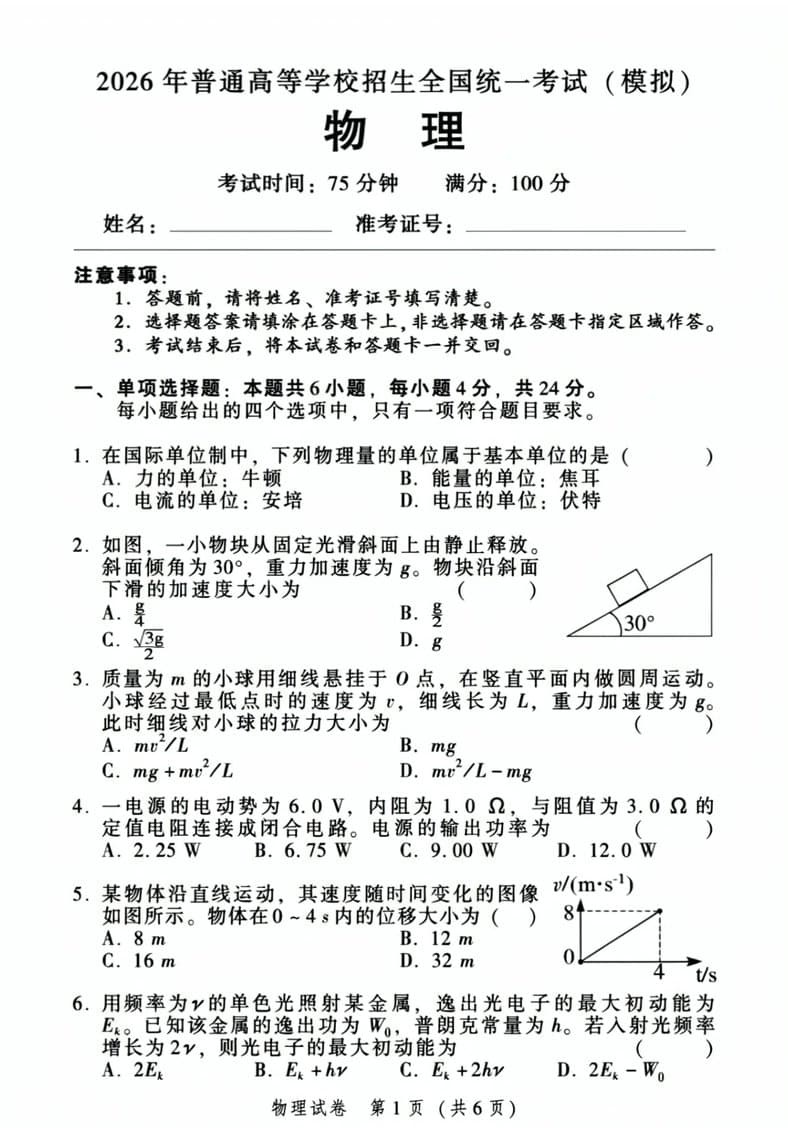
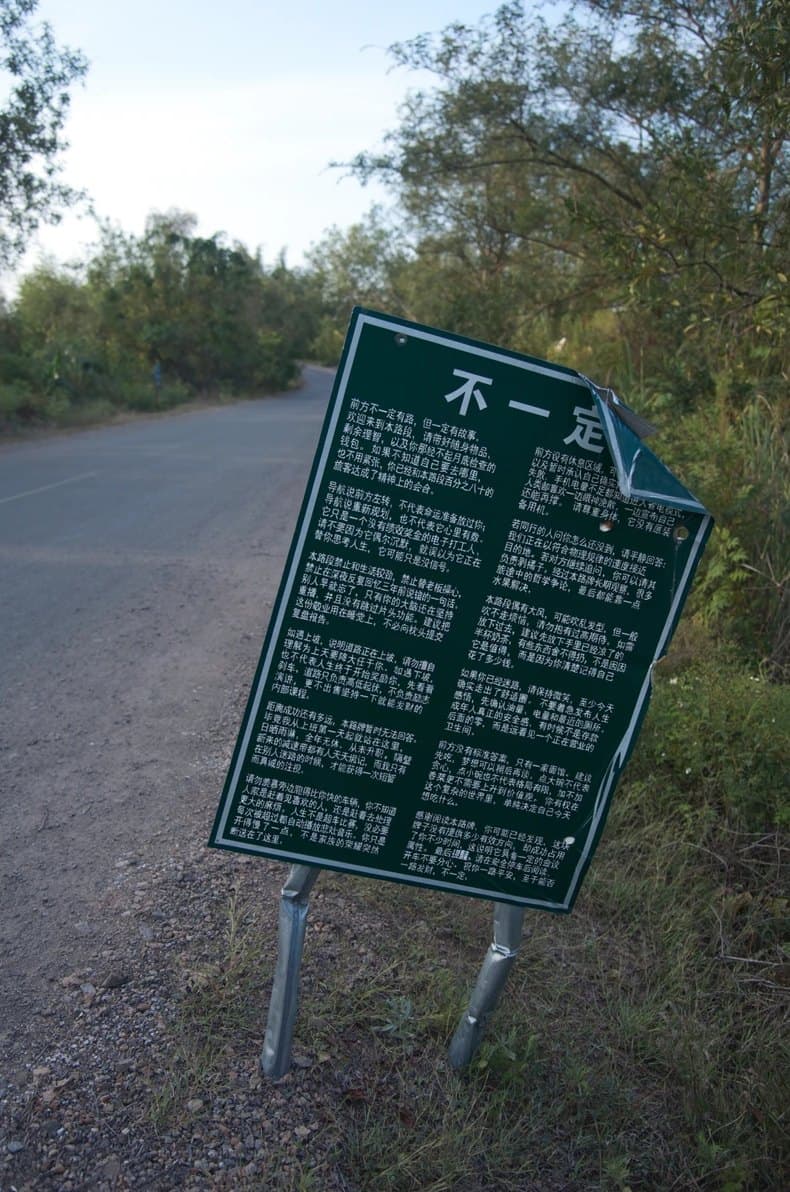
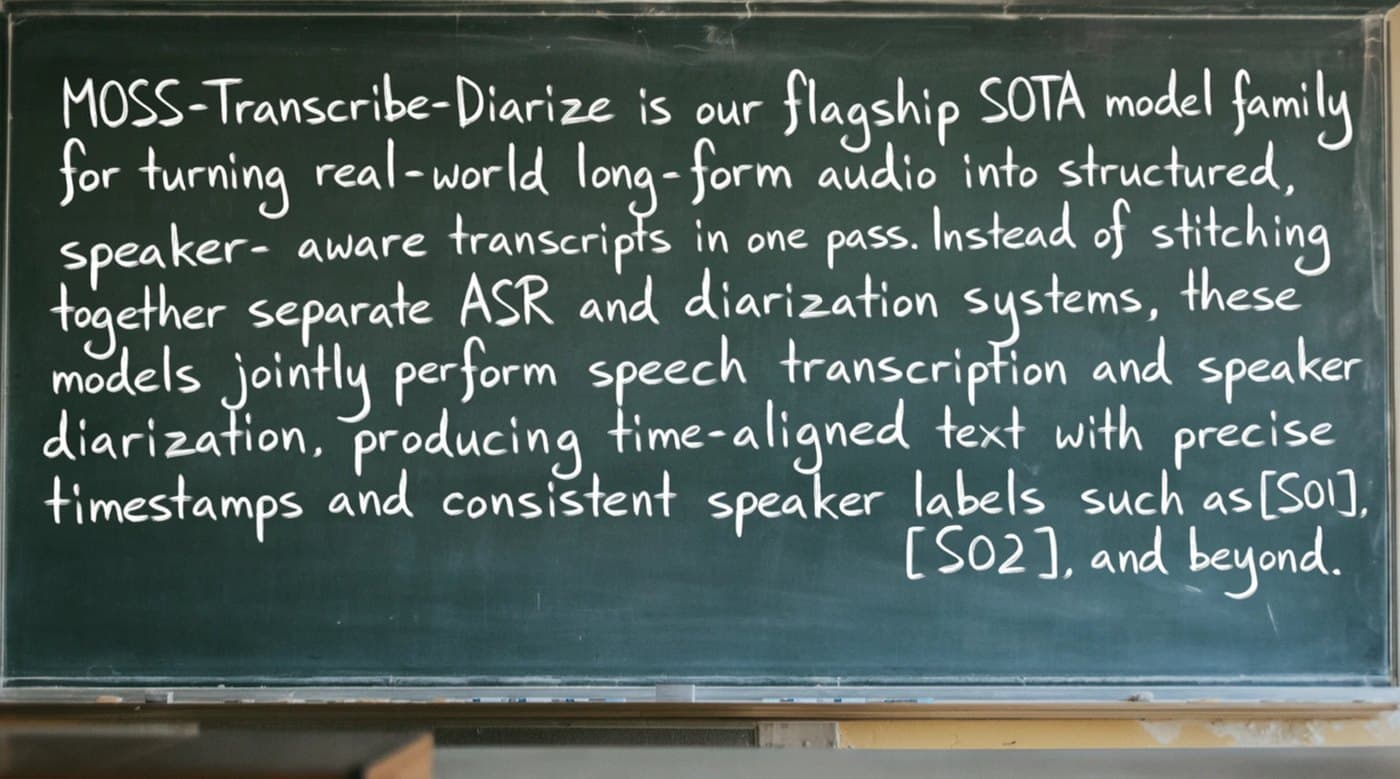
Dense Chinese and English text is where MOSS-Image stands out. These are cut from the showcase in OpenMOSS's model card and not retouched; the prompts were not published, so each caption describes the image.
Recommended ComfyUI MOSS-Image settings
Steps: 25 to 50
OpenMOSS recommends 50 or more. The ComfyUI templates use 25 with the er_sde sampler, which takes about half the time.
CFG: 2.5 to 6
3 is the official default and enough for long prompts; raise it for short prompts. The 8-step and 4-step LoRAs use CFG 1.
Shift: 5
Built into the native model. If you change it, use ModelSamplingAuraFlow at multiplier 1, not ModelSamplingSD3.
Skip layer guidance: layer 22
Skipping layer 22 on the negative pass improves detail; layers 24 and 26 also work. Turning it off looks more photographic, but details can fall apart.
Resolution: 1 to 2 megapixels
1024 × 1024 up to about 1456 × 1456, in any aspect ratio with sides in multiples of 16. The model can go from 512 × 512 up to 2K.
Negative prompt: short tags
Leave it empty, or use the quality tags from OpenMOSS's user guide: worst quality, bad anatomy, watermark, jpeg artifact.
ComfyUI MOSS-Image speed and VRAM in community tests
OpenMOSS has not published VRAM figures. These are measurements people shared on YouTube, note.com, X and Hugging Face in the week after release; peak memory is for the whole GPU.
| Model files | Size and steps | Time per image | Peak VRAM | |
|---|---|---|---|---|
| RTX 5090, full precision | SFT bf16 | 1024 × 1024, 50 steps | 27.4 s | 29.2 GiB |
| RTX 5090, 8-bit | SFT int8 | 1024 × 1024, 50 steps | 10.5 s | 16.4 GiB |
| RTX 5090, template steps | int8 | 1 megapixel, 25 steps | 5.7 s | Not reported |
| RTX 4070 12 GB | Base int8, text encoder int8 | 832 × 1216, 50 steps | 50 to 52 s | 11.6 GiB |
| RTX 3060 Ti 8 GB | int8 | 720p, 50 steps | 52 s | Not reported |
| DGX Spark | Not reported | 1024 × 1024, 25 and 50 steps | 30 s and 48 s | Not reported |
ComfyUI MOSS-Image workflows, tools and tutorials
Official sources first, then community projects, all checked on October 20, 2026.
How to write ComfyUI MOSS-Image prompts
- 1
Describe the scene in English
English has the most training data. Describe the subject, setting, lighting and style; a prompt can run up to 4,096 tokens.
- 2
Quote the text you want
Put the exact wording in quotation marks and add line breaks where lines should break. Chinese and English both work.
- 3
Place things with a layout
For posters and pages, use the Layout-Guided template or a JSON layout: a summary caption plus items with boxes in pixels measured from the centre of the canvas.
ComfyUI MOSS-Image prompts to start with
Paste these into the positive prompt, or the negative prompt where noted. The layout example is for a 1024 × 1024 canvas.
JSON layout (official example)
{"summary": {"meta": ["poster"], "canvas": "single", "caption": "A minimalist travel poster with a cream background, a blue mountain illustration, and the title EXPLORE at the top."}, "items": [{"label": "text", "caption": "Large dark-blue uppercase title centered at the top.", "text": "EXPLORE", "bbox": [-416, -384, -288, 384]}, {"label": "object", "caption": "A flat blue mountain illustration in the lower center.", "bbox": [-192, -288, 384, 288]}], "bbox_coord_space": "abs_centralized", "bbox_format": "yxyx"}
Printed page with formulas
A printed physics exam page in Chinese titled "物理" with numbered multiple-choice questions, a small diagram of a block on a 30° slope and the footer "物理试卷 第1页(共6页)", flat scan, black ink on white paper
Tag order
best quality, highres, scenery, night city, river, skyline reflections, long exposure, no humans
Negative prompt (quality tags)
worst quality, bad anatomy, watermark, jpeg artifact
ComfyUI MOSS-Image errors and fixes
The problems reported most often in the first days after release, and what fixed them.
- CLIP Loader has no moss_image type
- Your ComfyUI is older than 0.42.0; 0.41.3 does not include MOSS-Image. Update, run pip install -r requirements.txt again and restart.
- Odd results after switching from the plugin
- Plugin workflows use ModelSamplingSD3, which has a different timestep scale. Open a native template instead of swapping loaders, and change shift with ModelSamplingAuraFlow at multiplier 1.
- Grey, washed-out images
- Remove --use-sage-attention from your launch options. Users on Comfy-Org's model page report that it desaturates MOSS-Image output.
- Out of memory
- Use the 8-bit model, the 4-bit text encoder and flux2-vae_small, stay around 1 megapixel, and let ComfyUI offload, or start it with --lowvram.
- Vertical stripes in SFT images
- A known SFT issue. Try the community DeBand LoRA, Kijai's negative-weight fix, or the Base model.
- Black images
- Usually fp16 overflow at high resolution. Run in bf16, or use KBlueLeaf's FP16-fixed weights.
- Very slow generation
- 50 steps with skip layer guidance means two passes per step. Use the template's 25 steps, an 8-step or 4-step LoRA at CFG 1, or the Spectrum nodes.
- Wrong or missing words
- Put the exact text in quotation marks, add line breaks where lines should break, write the rest of the prompt in English and raise CFG towards 4 to 6 for short prompts.
- The reference image does nothing
- MOSS-Image cannot use reference images. In the templates, ref_image only feeds the optional prompt enhancer.
- Same seed, different image than in Python
- Expected. ComfyUI's scheduler does not snap to the training grid the Python pipeline uses, so the outputs differ.
No GPU, or no time for a 13 GB download?
Try Qwen Image 2.1 online: similar text rendering, nothing to install
Setting up ComfyUI MOSS-Image takes a 13 GB download and a GPU with 12 GB or more. Qwen Image 2.1 is the model MOSS-Image is most often compared with: both write Chinese and English text inside images, and side-by-side tests find the results close. On Nano AI it runs in your browser for 8 credits per image, and it can also edit photos, which MOSS-Image cannot.
FAQ
ComfyUI MOSS-Image FAQ
Short answers to what people ask most about running MOSS-Image in ComfyUI.
Which ComfyUI version supports MOSS-Image?
0.42.0, released on October 18, 2026, or a nightly build from October 16 onwards (commit e087d8f6). 0.41.3 does not, even though some guides say it does.
Do I need a custom node for MOSS-Image in ComfyUI?
No. Since 0.42.0 the standard loaders read the files from Comfy-Org/MOSS-Image. OpenMOSS's plugin is only needed to load the original Hugging Face folder.
How much VRAM does ComfyUI MOSS-Image need?
There is no official figure. With the 8-bit model and 4-bit text encoder a 12 GB card worked in community tests, and 8 GB cards run 4-bit or GGUF setups with offloading, slowly. Full precision peaked at about 29 GiB on an RTX 5090.
Is there a GGUF or fp8 version of MOSS-Image?
Not from OpenMOSS or Comfy-Org, which ship 8-bit (int8) and 4-bit (w4a8) files instead. Community GGUF files exist but need extra custom nodes, and Comfy-Org has said GGUF will not be supported natively.
Where do the ComfyUI MOSS-Image files go?
Under ComfyUI/models: moss_image files in diffusion_models, qwen3.5_9b files in text_encoders, and flux2-vae files in vae.
Base or SFT for ComfyUI MOSS-Image?
SFT for everyday images. Base for LoRA training, or when a LoRA was trained on Base.
Can ComfyUI MOSS-Image edit images or use a reference image?
No, it is text-to-image only. For edits, Qwen Image 2.1 and Nano Banana 2.1 on Nano AI take up to 5 reference images.
Can I get similar results without installing anything?
Yes. Try OpenMOSS's Hugging Face demo, or Qwen Image 2.1 on Nano AI, the model MOSS-Image is most often compared with for text in images. New accounts in most regions get 16 free credits, enough for 2 Qwen Image 2.1 images.
More from Nano AI
Related pages
Nano AI is an independent service and is not affiliated with OpenMOSS, MOSI.AI or Comfy Org. File names, sizes and versions come from Hugging Face, GitHub and the ComfyUI release notes as read on October 20, 2026; speed and VRAM figures are community measurements. Sample images are from OpenMOSS's model card and used under the Apache 2.0 license.