
D3voz / Comfy / Higgsfield · 2026-11-03
OPENjutsu: two open-source Genjutsu routes
Looking for open-source Higgsfield character swap? Start with D3voz’s local ComfyUI app or Comfy’s separate hosted Openjutsu beta. This guide separates the projects, their costs and their published limits.
Nano AI is not D3voz Openjutsu, Comfy Openjutsu or Higgsfield Genjutsu. This form runs Hailuo 02 Standard: 6 seconds, 60 credits. It makes a new clip; it does not run their swap pipelines, Remotion or agent skills.
Duration
Ratio
Generated Videos
No videos yet
Fill out the form and click Generate Video to create your first AI video.
Tips: Use detailed descriptions for better results
- Made by
- D3voz / Comfy
- Run on Nano AI
- Hailuo 02 Standard · from 60 credits per video
- Page updated
- November 3, 2026
Source: github.com
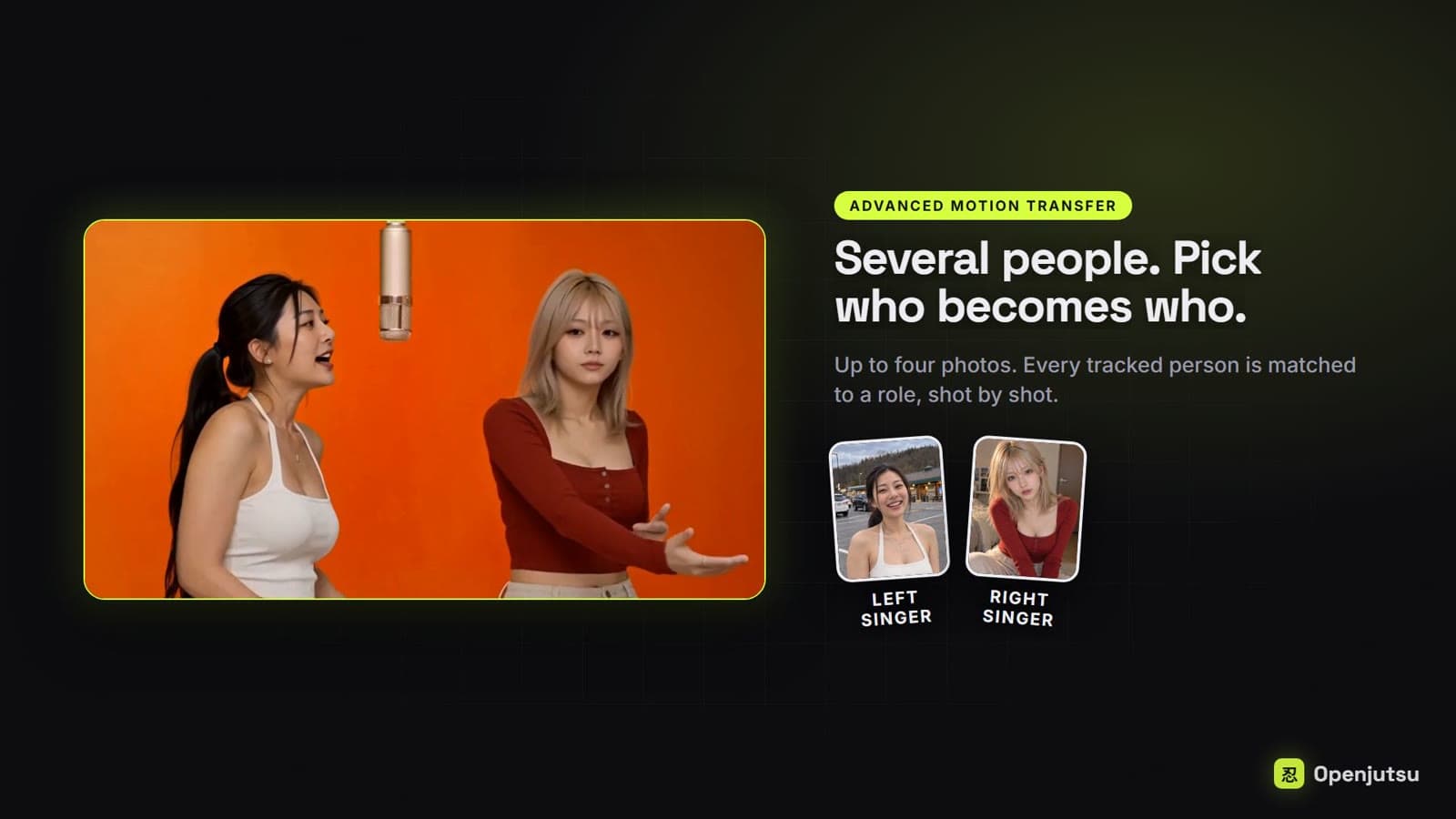
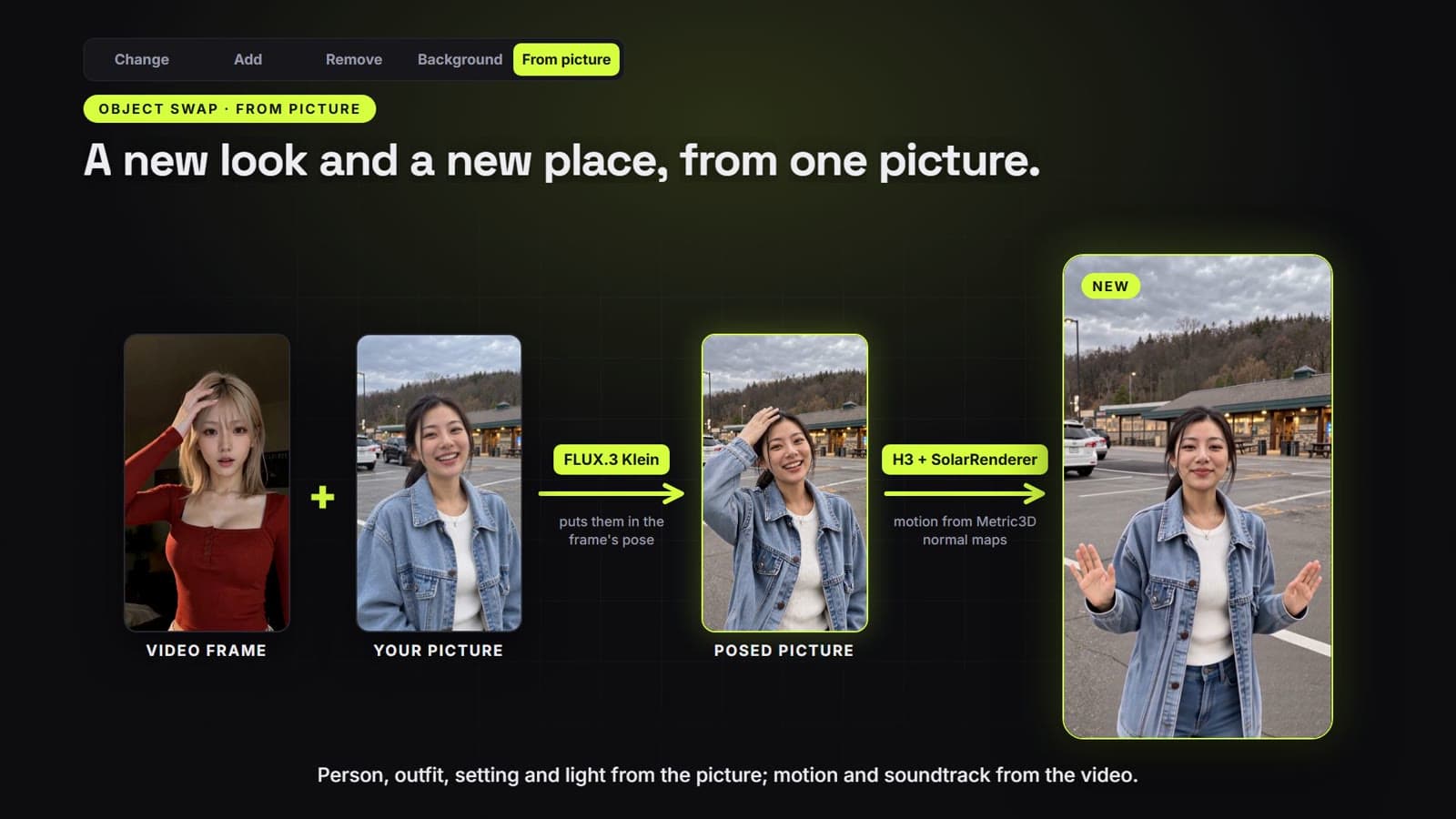
D3voz’s published demo stills
Downloaded from D3voz/openjutsu’s README on 2026-11-03. Advanced motion transfer and From picture are upstream demonstrations, not Nano AI outputs or our tests. Original annotations are retained; the source and MIT notice are linked below.
What OPENjutsu means
D3voz/openjutsu is an MIT app over ComfyUI and MiniMax H3, with SAM 3.1 tracking and a Qwen3-VL visual describer. Its README describes character and object changes while retaining camera motion, cuts and soundtrack. Simple mode targets the largest person; Advanced supports 1–4 characters. The software runs on your GPU: hardware and power still cost money. Model licenses are separate from the app’s MIT license.
Comfy’s Openjutsu is a different hosted beta at comfy.org/hub/apps/openjutsu, with source at Comfy-Org/comfy-openjutsu. Its README describes a 5–15 second character swap using a Developer Platform deployment. Runs consume deployment credits; the optional first-frame image is a separate Comfy Router charge. Cloning the interface does not provision the deployment.
Higgsfield Genjutsu is the hosted commercial product. Its product page describes recasting motion with character, location and product references. Account plans and usage terms apply; no fixed per-swap price is asserted here. The comparison below is source documentation, not a Nano AI quality benchmark. Its product FAQ says each generation uses Higgsfield credits and displays the cost before submission; D3voz instead runs on your own GPU.
Sources checked 2026-11-03. The Comfy Open Source Higgsfield challenge build window ended on 2026-11-03 at 9am PT; the announced winner date is 2026-11-10. This page names no winners.
OPENjutsu facts and this page’s generator
- Local project
- Your GPU / MIT app; separate model licenses
- Hosted beta
- Comfy deployment credits; separate first-frame charge
- D3voz requirements
- NVIDIA GPU; ComfyUI 0.41.2+; Node.js 22.6+; Python for comfy-api-proxy
- Published test setup, not a minimum
- RTX 4060 Ti 16 GB; 64 GB system RAM. File size is not a VRAM requirement.
- On Nano AI
- Hailuo 02 Standard · 6s · 60
Shortest D3voz install path
From the README checked 2026-11-03. Install ComfyUI, the listed nodes and models first. These commands are for your machine; nothing is installed on Nano AI.
- 1
Windows shortcut
With the repository checked out and ComfyUI running, Windows users can double-click start_openjutsu.bat. It installs proxy 0.1.6 in .venv-proxy, applies patch_proxy.py, installs packages and builds/opens the app.
git clone https://github.com/D3voz/openjutsu openjutsu cd openjutsu start_openjutsu.bat - 2
ComfyUI and proxy
Manual route: start ComfyUI at 127.0.0.1:8188, install comfy-api-proxy 0.1.6 as the README directs, apply python openjutsu/patch_proxy.py with the same Python, then run comfy-api-proxy run --max-upload-mb 500 on 127.0.0.1:8189. On Windows set AIOHTTP_NOSENDFILE=1 before starting ComfyUI.
- 3
Manual app start
After cloning, copy the environment file and start the app. COMFY_BASE_URL=http://127.0.0.1:8189; COMFYUI_URL=http://127.0.0.1:8188; leave COMFY_API_KEY empty for the local proxy. Open 127.0.0.1:3000. Restart ComfyUI after installing nodes.
cp .env.example .env.local
npm ci
npm run build
npm start
README model files and node packs
Paths are under ComfyUI/models or ComfyUI/custom_nodes. File sizes are not stated in this README. The first seven files are the base list; face-fix files and SolarRenderer are mode-specific. From picture has further requirements linked from the README.
| File / pack | Destination | Scope |
|---|---|---|
| minimax_h3_ref2va_pruned_int8_convrot.safetensors | ComfyUI/models/diffusion_models/ | Base workflow |
| minimax_h3_DMAD_4step_full_lora_avg_rank_39_bf16.safetensors | ComfyUI/models/loras/ | Base workflow |
| qwen3vl_32b_minimax_h3_int4_convrot.safetensors | ComfyUI/models/text_encoders/ | Base workflow |
| qwen3vl_8b_int8_convrot.safetensors | ComfyUI/models/text_encoders/ | Base workflow |
| minimax_h3_video_vae_int8_convrot.safetensors | ComfyUI/models/vae/ | Base workflow |
| minimax_h3_audio_vae_fp32.safetensors | ComfyUI/models/vae/ | Base workflow |
| sam3.1_multiplex_fp16.safetensors | ComfyUI/models/checkpoints/ | Base workflow |
| face_yolov8m.pt | ComfyUI/models/ultralytics/bbox/ | Fix faces; optional |
| person_yolov8m-seg.pt | ComfyUI/models/ultralytics/segm/ | Fix faces; optional |
| sam_vit_b_01ec64.pth | ComfyUI/models/sams/ | Fix faces; optional |
| buffalo_l | ComfyUI/models/insightface/models/ | Fix faces; optional |
| solarrenderer_4step_lora.safetensors | ComfyUI/models/loras/ | From picture → SolarRenderer; optional |
| solarrenderer_control_lora.safetensors | ComfyUI/models/loras/ | From picture → SolarRenderer; optional |
| SolarRenderer | ComfyUI/custom_nodes/ | Custom node pack; enable the modes you need |
| ComfyUI-MiniMaxH3-Context-Loop 0.7.3+ | ComfyUI/custom_nodes/ | Custom node pack; enable the modes you need |
| ComfyUI-Fantastic-MiniMaxH3-PromptBuilder | ComfyUI/custom_nodes/ | Custom node pack; enable the modes you need |
| ComfyUI-KJNodes | ComfyUI/custom_nodes/ | Custom node pack; enable the modes you need |
| comfyui_controlnet_aux | ComfyUI/custom_nodes/ | Custom node pack; enable the modes you need |
| ComfyUI-VideoHelperSuite | ComfyUI/custom_nodes/ | Custom node pack; enable the modes you need |
| comfyui-h3-oneclick-swap | ComfyUI/custom_nodes/ | Custom node pack; enable the modes you need |
| ComfyUI-H3-FaceRefine | ComfyUI/custom_nodes/ | Custom node pack; enable the modes you need |
| ComfyUI-Impact-Pack | ComfyUI/custom_nodes/ | Custom node pack; enable the modes you need |
| comfyui-image-detail-contrast | ComfyUI/custom_nodes/ | Custom node pack; enable the modes you need |
| Orion4D_FXMax | ComfyUI/custom_nodes/ | Custom node pack; enable the modes you need |
| comfyui-websocket-reconnect-fix | ComfyUI/custom_nodes/ | Custom node pack; enable the modes you need |
Capabilities and README limits
Targeted edits
D3voz documents Simple and Advanced motion transfer, object changes/removal, background edits, From picture, relighting and face/colour fixes. The demo stills below belong to that project, not to the Hailuo generator.
Reflections are unsupported
D3voz says mirrors and reflections do not work yet: the reflection retains the original person and can contaminate the generated appearance. Choose footage without a reflection of the subject.
Masks and clothing outlines
Object Change keeps the old outline: turning a tank top into a shirt can leave it sleeveless. Small faces can be poor. Check mask previews what will regenerate; the preflight does not verify dependencies, file integrity or available VRAM.
License scope
MIT covers the D3voz app, not every model. Its README flags InsightFace buffalo_l as non-commercial research only and the listed Ultralytics weights as AGPL-3.0. Read each component’s terms.
Four open alternatives: code is not the compute
Public READMEs checked 2026-11-03. These are separate projects or related implementations, not a claim that every repository is a fork. Higgsfield’s hosted service is described above; no ranking or measured equivalence is implied.
| Runtime / payment | Documented scope | Difference | |
|---|---|---|---|
| D3voz/openjutsu | Own NVIDIA GPU; hardware and power | MiniMax H3 + ComfyUI; 1–4 characters, object edits | Local generation; app MIT, models separate |
| Comfy-Org/comfy-openjutsu | Developer Platform deployment credits | One 5–15 second part; optional paid first frame | Source for the hosted beta; not D3voz |
| akatz-labs/h3-character-swap-tool | Local Linux x86-64 NVIDIA worker | Editable 5/10/15-second segments, masks and H3 LoRA V1.5 | README warns of identity drift; Docker alpha not yet a published image |
| Anil-matcha/open-genjutsu | Local interface; remote generation API credits | Seedance 2.5 motion-control request; FFmpeg restores source audio | Requires an API key; not offline open-weight inference |
Sources, downloads and licenses
Opened 2026-11-03. Use upstream documents for changes after this date.
Choose the route before installing
- 1
Install locally
Use D3voz if you want its ComfyUI workflow on your own NVIDIA GPU. Start with the requirements and file list below.
- 2
Use the hosted beta
Open Comfy’s app for its separate hosted workflow. Its source needs your own deployment and API key; running the front end alone is insufficient.
- 3
Make a new clip here
The form above uses Hailuo 02 Standard, 6 seconds for 60 credits. It does not accept a source performance video for character replacement.
Prompts for the Hailuo generator
These are new-clip prompts for Hailuo 02 Standard, not Openjutsu workflow instructions.
Paper boat
A red paper boat floats across a shallow stone basin. Slow camera push, soft daylight, no people, no readable text, no logos.
Steam study
A ceramic cup on a wooden table, steam drifting upward. Static camera, morning window light, no people, no readable text, no logos.
Courtyard lantern
A paper lantern sways in an empty courtyard at dusk. Gentle camera arc, no people, no readable text, no logos.
Toy train
A small wooden toy train rolls along a curved track. Low tracking shot, warm light, no people, no readable text, no logos.
Before your first local run
- Missing nodes or models
- Use the app’s preflight and the README links. It checks registered nodes and listed files, not Python dependencies, integrity or VRAM.
- Wrong endpoint or stalled video
- COMFYUI_URL points directly to ComfyUI on 8188; COMFY_BASE_URL points to the proxy on 8189. The README’s Windows AIOHTTP_NOSENDFILE=1 workaround addresses stalled video seeking.
- Review an authorised source clip
- Use footage and character references you have permission to process. Start with Check mask and a short part. Reflections remain unsupported.
FAQ
OPENjutsu FAQ
Public-source reference, checked 2026-11-03.
Does this page run OPENjutsu?
No. Nano AI runs Hailuo 02 Standard here: 6 seconds for 60 credits. It does not run D3voz Openjutsu, Comfy Openjutsu or Higgsfield Genjutsu, and does not transfer a source clip’s performance.
Which Openjutsu can I install?
D3voz/openjutsu is the local MIT app described below. Comfy-Org/comfy-openjutsu is a different MIT front end for a Comfy deployment, also used by the hosted beta.
Is open-source Genjutsu free to run?
The D3voz software is MIT; your hardware, electricity and model-license obligations remain. Comfy uses deployment credits. open-genjutsu needs remote video API credits. An open interface does not make its backend free.
What GPU do I need?
D3voz requires NVIDIA and reports testing an RTX 4060 Ti 16 GB with 64 GB RAM. That is a tested configuration, not a universal minimum. Comfy’s separate README reports a 96 GB RTX PRO 6000 deployment and says smaller configurations were not tested.
What does the README say cannot work?
D3voz says mirrors/reflections do not work yet, outlines constrain object changes, and small faces can be poor. Those are upstream statements; this site has not executed the pipeline.
Has the challenge announced winners?
The build window ended 2026-11-03 at 9am PT. Comfy lists 2026-11-10 for winners. No winners are claimed here.
More from Nano AI
Related model and ComfyUI guides
Independent reference page. Nano AI is not affiliated with D3voz, Comfy, Higgsfield, MiniMax or Akatz Labs. Upstream demonstrations are credited to their authors.