
Public sources read 2026-11-03
FilmCraft download, editing workflow and browser alternatives
FilmCraft is ArtCraft’s open-source non-linear video editor in Rust. Its familiar timeline targets editing existing footage. This page explains the official download route and offers a separate generator for new B-roll.
This is Nano AI, not FilmCraft or Adobe Premiere Pro. This form runs Kling 2.6: 5 seconds for 55 credits, without audio. It does not load FilmCraft models or accounts, open projects, edit a timeline or run the editor.
Duration
Ratio
Generated Videos
No videos yet
Fill out the form and click Generate Video to create your first AI video.
Tips: Use detailed descriptions for better results
- Made by
- ArtCraft
- Run on Nano AI
- Kling 2.6 · from 55 credits per video
- Page updated
- November 3, 2026
Source: github.com
Official demonstrations
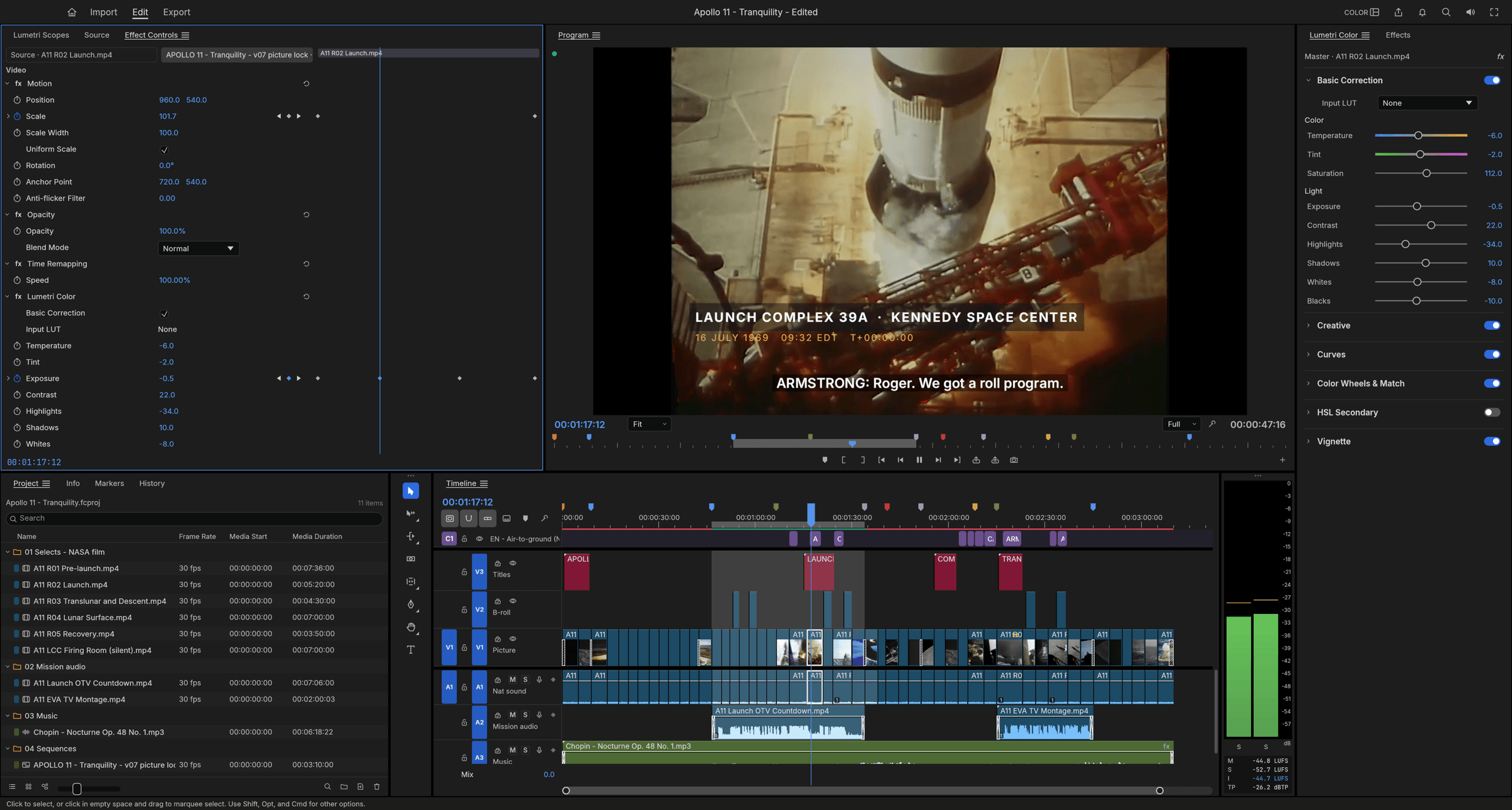
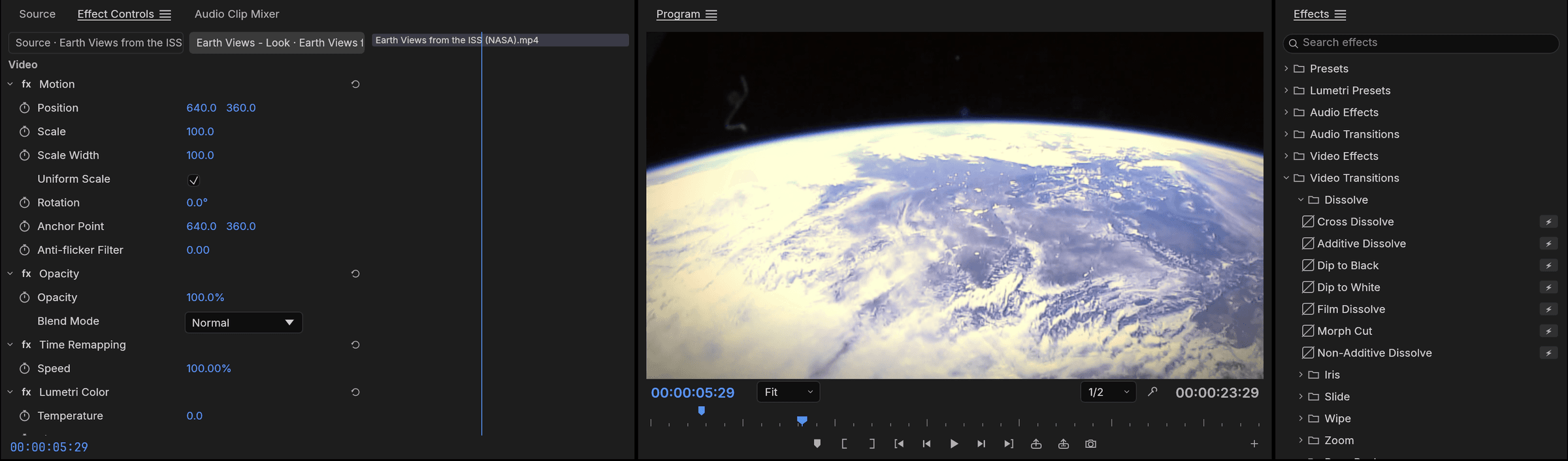
Official material downloaded on 2026-11-03. These are upstream interface screenshots or video posters, not Nano AI outputs or our generation tests. Original labels are retained; each image links to its source.
FilmCraft download, editing workflow and browser alternatives
The official README describes editing, trimming, colour, titles, captions, mixing and export. It lists macOS, Windows, Linux and a WebAssembly front end. The application is dual-licensed MIT or Apache-2.0.
The README calls FilmCraft alpha. Native .prproj import is not supported: it suggests FCP7 XML, AAF or OTIO instead. Plugin hosting is absent, and Windows/Linux receive less testing than macOS. These are published limitations, not our benchmark.
Verified scope
- Product
- FilmCraft
- Official source
- github.com
- On this page
- Kling 2.6
- Boundary
- New 5-second silent clip
Official download route
Use the official pages below. We have not installed or benchmarked the software.
- 1
Choose a release
Choose the launcher or a standalone installer on the official FilmCraft page for your platform. The README also links releases and checksums.
- 2
Follow the project instructions
Import a small test clip, mark its range, place it on the timeline, check captions and export. For source development, the README prints the command below.
cargo run --release -p filmcraft
Downloads and source
| Resource | Purpose |
|---|---|
| FilmCraft | Installers and current instructions |
| storytold/filmcraft | README, releases and limitations |
Choose by the job
Edit your footage
Choose the official editor for a multi-track timeline, trims and captions.
Try a copy first
Check your own media and interchange files before migrating a production project. Similar panels do not establish complete Premiere compatibility.
Generate an insert
Kling 2.6 here makes a new silent clip. Download it and import it into an editor yourself.
Workflow comparison
Public sources read 2026-11-03
| Official product | Generator here | |
|---|---|---|
| Input | Existing footage and project media | Text prompt or one image |
| Result | Timeline edit and export | New 5-second silent clip |
| Payment | App: MIT OR Apache-2.0 | Kling 2.6: 55 credits / 5 seconds |
Downloads and source
Public sources read 2026-11-03
A practical workflow
- 1
Choose a prompt
Pick an object or empty scene from the suggestions. Use the official product links for its own workflow.
- 2
Check the model and cost
Keep the named model selected and check the displayed credit cost. For video, the preset is 5 seconds without audio.
- 3
Generate and download
Sign in to generate a new asset. Download the result and import it into your editing workflow yourself.
Ideas for a new image or clip
Original prompts for the named Nano AI model. These do not operate the other product.
Paper boat
A red paper boat floats across a shallow stone basin. Slow camera push, soft daylight, no people, no readable text, no logos.
Morning steam
A ceramic cup on a wooden table, steam drifting upward. Static camera, morning window light, no people, no readable text, no logos.
Lantern
A paper lantern sways in an empty courtyard at dusk. Gentle camera arc, no people, no readable text, no logos.
Wooden train
A small wooden toy train rolls along a curved track. Low tracking shot, warm light, no people, no readable text, no logos.
Before migrating
- Test a copy
- Open a small copy of a project and check media, playback and export before moving production work.
FAQ
FilmCraft · Questions and answers
Public sources read 2026-11-03
Does this page run the official product?
No. This is a separate Kling 2.6 generator on Nano AI, not FilmCraft or Premiere.
Where can I try or download it?
Use getartcraft.com/apps/filmcraft for the official launcher or standalone builds; the README links GitHub releases.
Is it free?
The official app is free and open source under MIT or Apache-2.0. This separate Kling generator costs 55 credits for 5 seconds.
Can this replace the whole workflow?
No. The generator does not edit footage. FilmCraft is alpha and its README says native .prproj import and plugin hosting are not available.
Who made the sample images?
Credited to the original publisher, with a source link under each image. These are official demonstrations, not Nano AI outputs or our generation tests.
More from Nano AI
Related guides
Nano AI is independent and is not affiliated with ArtCraft. Product details were read on 2026-11-03. The credited demonstrations belong to their original publishers.