
Sources read 2026-11-05
Agent Screenplay · Guide
Make a real screen recording from a scenario written by your coding agent. This guide covers installation and the recording/rendering split; the generator above is only a separate concept-video option.
Here Veo 3.1 Fast costs 60 credits per video. It is not Screenplay, does not navigate a website or record your screen, and cannot demonstrate that real UI actions worked.
Ratio
Generated Videos
No videos yet
Fill out the form and click Generate Video to create your first AI video.
Tips: Use detailed descriptions for better results
- Made by
- gmpetrov / Screenplay contributors
- Run on Nano AI
- Veo 3.1 Fast · from 60 credits per video
- Page updated
- November 5, 2026
Source: github.com
Published source example
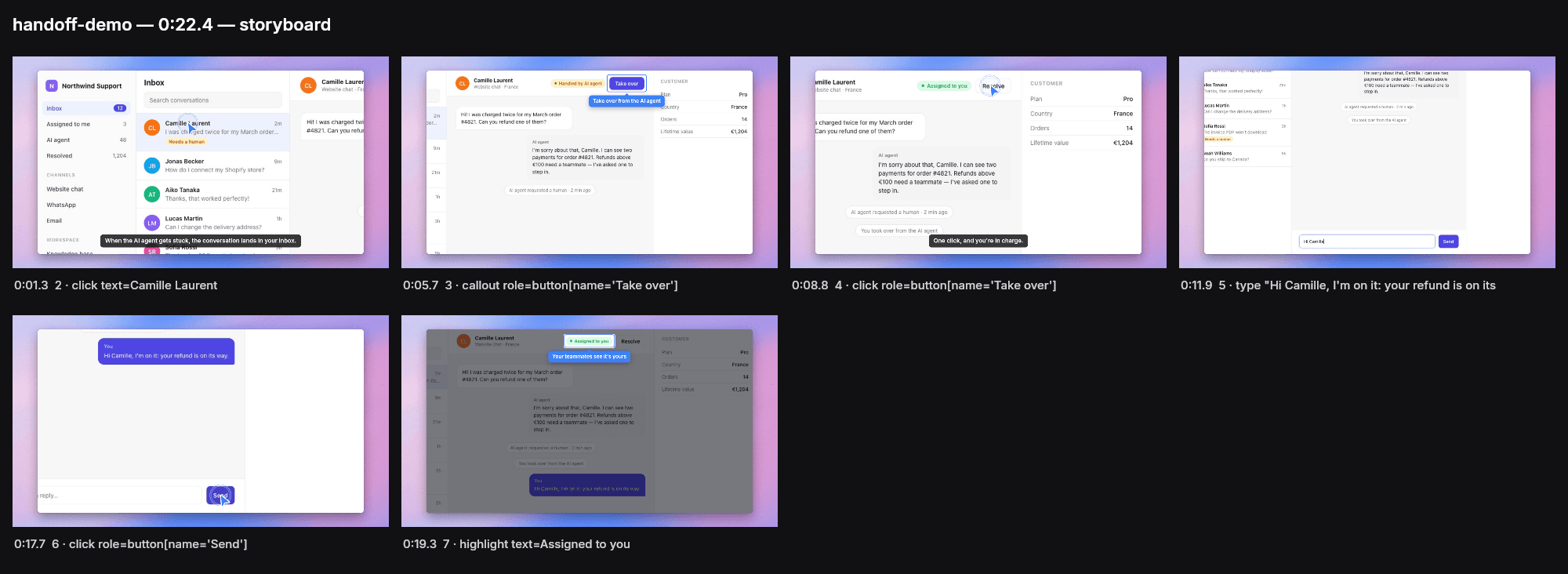
The official README storyboard of a handoff demo. It illustrates a recording workflow; no Nano AI video or UI verification is claimed. Read 2026-11-05. Not generated by Nano AI; not a measured result from the generator above.
Agent Screenplay: What the sources establish
Sources read 2026-11-05. The official README says Screenplay contains no AI and needs no model key: your agent writes the scenario, Screenplay records and edits it. Node 20+ is required. check rehearses actions, record films, and render re-edits the last take. Actions really execute; use a demo account.
Make a real screen recording from a scenario written by your coding agent. This guide covers installation and the recording/rendering split; the generator above is only a separate concept-video option.
At a glance
- Source read
- 2026-11-05
- Original project
- gmpetrov / Screenplay contributors
- Generator here
- Veo 3.1 Fast
- Output here
- 60 credits per video
Official setup route
Use the linked upstream instructions for your environment; no install or GPU inference was performed here.
- 1
Get the project
The official README says Screenplay contains no AI and needs no model key: your agent writes the scenario, Screenplay records and edits it. Node 20+ is required. check rehearses actions, record films, and render re-edits the last take. Actions really execute; use a demo account.
npx agent-screenplay init - 2
Check its configuration
Use Node 20+ and restart your agent after init installs Chromium, MCP and the guide. Write demo.json for a demo account: check and record really perform the scenario actions.
- 3
Open the official workflow
Use the linked upstream instructions for your environment; no install or GPU inference was performed here.
npx agent-screenplay check demo.json
npx agent-screenplay record demo.json
Source files and downloads
| Resource | Purpose |
|---|---|
| README.md | Official starting point |
Choose the right workflow
Original project
The official README says Screenplay contains no AI and needs no model key: your agent writes the scenario, Screenplay records and edits it. Node 20+ is required. check rehearses actions, record films, and render re-edits the last take. Actions really execute; use a demo account.
Try here
Here Veo 3.1 Fast costs 60 credits per video. It is not Screenplay, does not navigate a website or record your screen, and cannot demonstrate that real UI actions worked.
Published example
The official README storyboard of a handoff demo. It illustrates a recording workflow; no Nano AI video or UI verification is claimed.
Original workflow and this generator
Sources read 2026-11-05.
| Original project | Nano AI | |
|---|---|---|
| Purpose | The official README says Screenplay contains no AI and needs no model key: your agent writes the scenario, Screenplay records and edits it. Node 20+ is required. check rehearses actions, record films, and render re-edits the last take. Actions really execute; use a demo account. | Here Veo 3.1 Fast costs 60 credits per video. It is not Screenplay, does not navigate a website or record your screen, and cannot demonstrate that real UI actions worked. |
| Access | Follow the official source | Sign in and use the generator above |
| Price here | Separate provider and billing | Veo 3.1 Fast · 60 credits per video |
Public sources
Create an original result
- 1
Prepare your idea
Choose an original prompt below. For image-to-video, upload one image you have permission to use.
- 2
Check the model and credits
The model shown above is the service used here; the source project’s features do not transfer to it.
- 3
Generate and review
Sign in, submit and inspect the result. Published examples are references, not a promise to reproduce them.
Prompts to adapt
Original templates to adapt. Published examples above are separate source material.
Studio
Create an original abstract concept clip about organizing work: blank cards glide into neat rows on a desk, smooth camera, no real website, no readable interface or text.
Detail
An original close-up of a stylized blank dashboard made of paper panels, gentle camera drift, no logos, no readable text, not a screen recording.
Setting
An original concept scene of colored blocks moving from one tray to another to represent a handoff, clean studio, no interface or text.
Variation
A clean desktop with a closed unbranded laptop and notebook, gentle light changes, no person, no readable screen, no UI recording.
Setup limits
- Check upstream requirements
- Keep source-project credentials and billing separate from Nano AI. No performance guarantee is made.
FAQ
Agent Screenplay · Questions before you start
Source facts and the separate hosted workflow.
Which model runs here?
Here Veo 3.1 Fast costs 60 credits per video. It is not Screenplay, does not navigate a website or record your screen, and cannot demonstrate that real UI actions worked.
What does the original project do?
The official README says Screenplay contains no AI and needs no model key: your agent writes the scenario, Screenplay records and edits it. Node 20+ is required. check rehearses actions, record films, and render re-edits the last take. Actions really execute; use a demo account.
Did Nano AI generate this example?
The official README storyboard of a handoff demo. It illustrates a recording workflow; no Nano AI video or UI verification is claimed. Read 2026-11-05. Not generated by Nano AI; not a measured result from the generator above.
Are speed or quality claims tested here?
No local GPU or third-party inference benchmark was run. A static source image cannot establish motion, audio synchronization or an end-to-end speedup.
Where should I go next?
Use the related pages below for the existing model overview or another workflow.
More from Nano AI
Related guides
Nano AI is independent of the named projects and vendors. Public sources were read on 2026-11-05. Published media belongs to its source; this page does not add credits to third-party accounts.