
Community adapters · Sources read 2026-11-04
MOSS-Image IDM 2-Step vs 4-Step, 8-Step and 50-Step
Which few-step checkpoint should you download? Compare the SFT teacher with three community adapters, see the author’s text examples, and install the IDM-specific files. This is a checkpoint guide, not a measured speed race.
This generator runs Qwen Image 2.1 for 8 credits per 1K image, as on /moss-image. Nano AI does not load IDM or LoRA files and does not run MOSS-Image weights.
64 free credits = 8 standard images. No card required.
Output board

Your generated variations will appear here.
- Made by
- akhaliq / OpenMOSS
- Run on Nano AI
- Qwen Image 2.1 · 8 credits per image
- Page updated
- November 5, 2026
Source: huggingface.co
Published IDM v1 text examples
Original 1024 × 1024 files from akhaliq’s Hugging Face model card, read 2026-11-04: 2 steps, seed 42, export 750. English menu and Chinese café sign; not generated by Nano AI. These two images are not a same-prompt 2/4/8/50-step comparison.
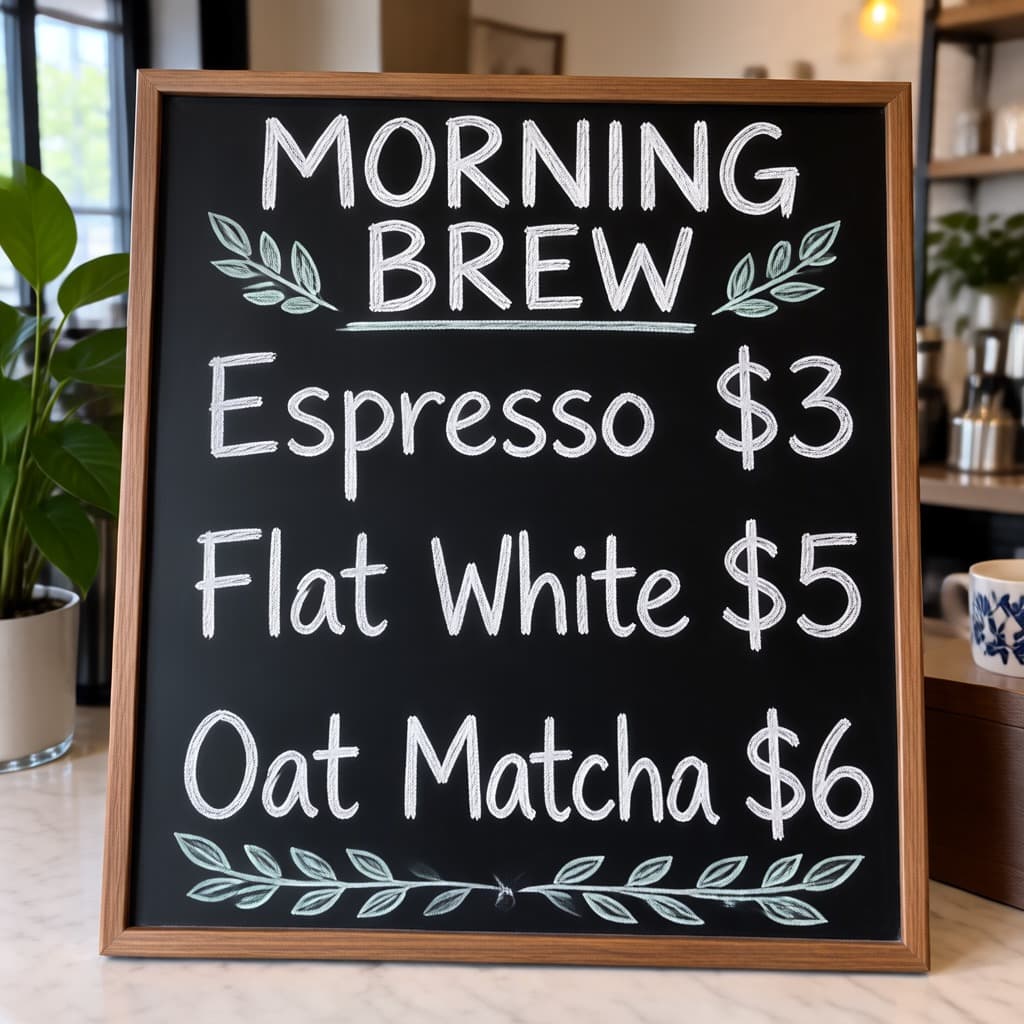
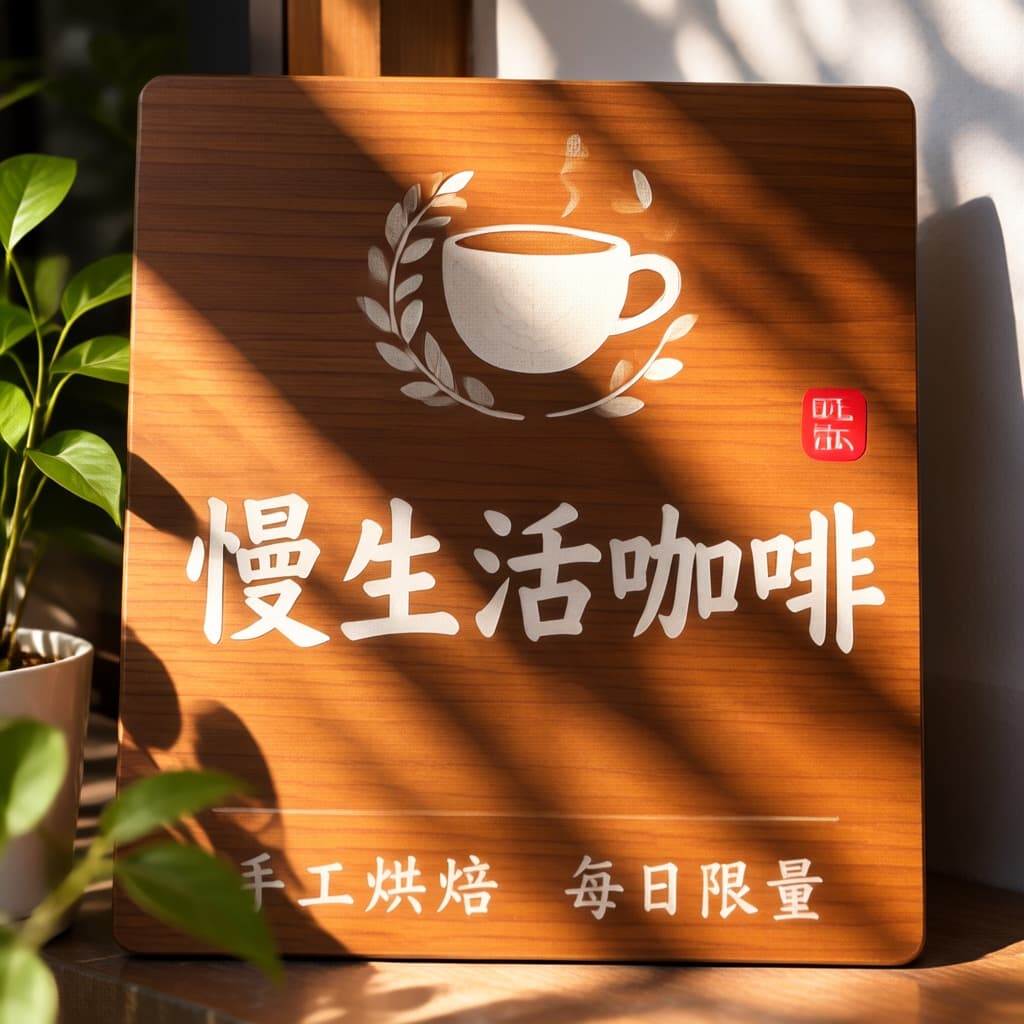
MOSS-Image IDM 2-step: follow the lineage
Lineage from the Hugging Face model cards read on 2026-11-04: MOSS-Image-Base → MOSS-Image-SFT (50) → lodestones DMD (8) → darask0 DMAD (4) → akhaliq IDM v1 (2). These are successive distillation projects, not four step settings for one ordinary sampler. The starting teacher is SFT; MOSS-Image-Base is a distinct checkpoint.
The IDM author recommends v1 export 750 at runs/idm/export/000750/ for text-to-image. The root adapter is the experimental v2 editing continuation, which the author says degraded general text-to-image. These are community implementations; the 2-step adapter is not the original IDM paper’s released weights.
For posters, menus and Chinese/English signs, inspect the published examples above. The author’s evaluation is visual and has no LongText-Bench score. In the reported edit experiments, sketch-to-photo and colorization still failed at 2–4 steps; armV5 at 50 steps succeeded on those cases. Attribute changes are a separate, experimental v2 use case. This site has not rerun those GPU experiments.
Checkpoint checklist
- Read date
- 2026-11-04
- Recommended text-to-image
- v1 export 750 · runs/idm/export/000750/
- Local precision
- SFT bf16 base; fp32 time path; quantized bases untested
- Generator on this page
- Qwen Image 2.1 · 8 credits · 1K
Install the IDM-specific ComfyUI path
Start with a working MOSS-capable ComfyUI installation. The full base tutorial stays on /comfyui-moss-image; these are the extra IDM requirements. Commands below run from the ComfyUI root and use the Hugging Face CLI through uvx.
- 1
Check MOSS-Image support
The IDM card requires a ComfyUI build with MOSS-Image support (master from 2026-10-16 or later). Do not swap this adapter onto MOSS-Image-Base.
- 2
Download the SFT base, encoder and VAE
Use moss_image_sft_bf16.safetensors, a Qwen3.5-9B text encoder and flux2-vae.safetensors from Comfy-Org/MOSS-Image. This guide selects the listed bf16 encoder. The IDM author has not tested quantized diffusion bases.
uvx --from huggingface_hub hf download Comfy-Org/MOSS-Image \ diffusion_models/moss_image_sft_bf16.safetensors \ text_encoders/qwen3.5_9b_bf16.safetensors \ vae/flux2-vae.safetensors --local-dir models - 3
Download v1 and put the three files together
hf download preserves runs/idm/export/000750/. Copy its three files directly into models/rapid_moss/akhaliq-idm-2step/: the node scans direct child folders, not nested exports.
uvx --from huggingface_hub hf download akhaliq/MOSS-Image-IDM-2-Steps \ runs/idm/export/000750/lora.safetensors \ runs/idm/export/000750/time_embedding.safetensors \ runs/idm/export/000750/dataspace.safetensors --local-dir /tmp/moss-idm-v1 mkdir -p models/rapid_moss/akhaliq-idm-2step cp /tmp/moss-idm-v1/runs/idm/export/000750/*.safetensors models/rapid_moss/akhaliq-idm-2step/ - 4
Install rapid-moss and restart
Copy the custom node from darask0’s repository to custom_nodes/rapid-moss/. Restart ComfyUI to register it.
uvx --from huggingface_hub hf download darask0/MOSS-Image_4-step_adapter_lora \ --include "comfyui/rapid-moss/*" --local-dir /tmp/rapid-moss cp -r /tmp/rapid-moss/comfyui/rapid-moss custom_nodes/rapid-moss - 5
Open the workflow and select 2 steps
Open custom_nodes/rapid-moss/example_workflows/rapid-moss-4step-native.json. Choose akhaliq-idm-2step, set the rapid-moss node’s steps to 2, Load CLIP type to moss_image, and use BasicGuider with SamplerCustomAdvanced. Keep the node’s SAMPLER and SIGMAS connections; do not retain the template’s 4-step setting.
Files required for IDM v1
Paths verified against the IDM card, Comfy-Org file listing and rapid-moss node source on 2026-11-04. No weights are downloaded by Nano AI.
| File | Destination | Role |
|---|---|---|
| moss_image_sft_bf16.safetensors | ComfyUI/models/diffusion_models/ | SFT diffusion base, bf16 |
| qwen3.5_9b_bf16.safetensors | ComfyUI/models/text_encoders/ | Qwen3.5-9B text encoder |
| flux2-vae.safetensors | ComfyUI/models/vae/ | FLUX.2 VAE |
| lora.safetensors | ComfyUI/models/rapid_moss/akhaliq-idm-2step/ | Unmerged v1 LoRA delta |
| time_embedding.safetensors | ComfyUI/models/rapid_moss/akhaliq-idm-2step/ | fp32 time path |
| dataspace.safetensors | ComfyUI/models/rapid_moss/akhaliq-idm-2step/ | Data-space mixing and 2 step codes |
What each stage changes
50 → SFT
SFT teacher: 50 steps, CFG 3. The IDM card counts 100 DiT forwards per 1024² image.
8 → DMD
lodestones: work-in-progress data-space DMD, 8 evaluations without CFG; update 2600.
4 → DMAD
darask0: a CFG-free 4-step DMAD continuation of lodestones, with its own sampler.
2 → IDM v1
akhaliq: IDM 2-step text-to-image v1; use export 750. The card counts 2 DiT forwards, not an end-to-end speedup.
MOSS-Image: 2 vs 4 vs 8 vs 50 steps
Hugging Face model cards, read 2026-11-04. Network evaluations are not seconds: text encoding, VAE decoding and hardware also affect runtime. No Nano AI performance benchmark.
| 50 · SFT | 8 · DMD | 4 · DMAD | 2 · IDM | |
|---|---|---|---|---|
| Author / project | OpenMOSS | lodestones | darask0 | akhaliq |
| Method | SFT | data-space DMD | DMAD | IDM |
| Sampling | 50 steps · CFG 3 | 8 · no CFG | 4 · no CFG | 2 · no CFG |
| Checkpoint | MOSS-Image-SFT | update 2600 | DMAD continuation | v1 export 750 |
| Main caution | More network evaluations | Work in progress | Dedicated time path + sampler | v2 regresses text-to-image |
Downloads and source pages
Read 2026-11-04. Technical instructions above use the primary Hugging Face cards and node source. Civitai is a discovery link, not a verified IDM download.
Try the separate Qwen Image 2.1 generator
- 1
Choose one text layout
Use an original poster or menu prompt below. This does not run an IDM checkpoint comparison.
- 2
Keep Qwen Image 2.1 selected
The price here is 8 credits per 1K image. IDM files, local step counts and ComfyUI settings do not change this endpoint.
- 3
Generate and inspect the text
Sign in, generate and read the text in the image. The output is Qwen Image 2.1, not MOSS-Image IDM.
Original prompts for the hosted generator
These prompts are for Qwen Image 2.1. They are not the source prompts or a reproduction of the IDM evaluation.
Bilingual poster
An original botanical exhibition poster on cream paper, title "GARDEN NOTES", subtitle "花园笔记", a green leaf illustration in the center, generous margins, no people, no logos.
Menu layout
A simple chalkboard menu titled "TEA BREAK", exactly two lines "Green tea $3" and "Oat latte $5", chalk lettering and a small teacup drawing, no people, no logos.
Book cover
An original gardening book cover, title "SMALL GARDENS", subtitle "Notes for every season", a simple line drawing of three terracotta pots, cream and green palette, no people, no logos.
Exhibition card
An original gallery invitation card titled "PAPER & LIGHT", date "18 MAY", a folded paper sculpture on a pale blue background, clean type hierarchy, no people, no logos.
Why a normal LoRA Loader is insufficient
- bf16 merge changes the result
- The IDM card and darask0’s source describe the LoRA delta being lost in bf16 rounding when merged (about 81% relative error in their comparison). LoraLoaderModelOnly also omits the fp32 time path and data-space sampler. Use rapid-moss’s unmerged path; this does not mean all ordinary LoRAs need this node.
- Adapter missing from the selector
- Put lora.safetensors, time_embedding.safetensors and dataspace.safetensors in the same direct child of models/rapid_moss/. A nested runs/idm/export/000750/ directory is not discovered by _adapter_dirs().
- Four steps with a two-code adapter
- The node rejects steps greater than the number of step codes. For IDM v1 use 2, not the native example workflow’s default 4.
FAQ
MOSS-Image IDM 2-step FAQ
Answers from sources read 2026-11-04.
Which model runs on this page?
Qwen Image 2.1, 8 credits per 1K image. Nano AI does not load IDM/LoRA or MOSS-Image weights.
Which IDM checkpoint is recommended for text-to-image?
The author recommends v1 export 750 at runs/idm/export/000750/. The root/v2 adapter is experimental editing work and regressed general text-to-image.
Does 2 steps mean 50× faster?
No end-to-end timing is established here. The card compares 100 DiT forwards for the 50-step CFG 3 teacher with 2 for IDM. That count omits other work and is not a hardware-normalized speed benchmark.
Can 2–4 steps handle structural edits?
The author reports sketch-to-photo and colorization failures at 2–4 steps, while armV5 at 50 steps succeeded on those cases. Experimental attribute edits are different; this site has not rerun the tests.
Where are the full model and ComfyUI guides?
See /moss-image for the model overview, /comfyui-moss-image for the base installation, and /moss-image-vs-krea-2 for the other-model comparison. This page focuses on the IDM adapter.
More from Nano AI
MOSS-Image guides and comparisons
Nano AI is independent of OpenMOSS, akhaliq and the adapter authors. Facts and original example files were read on Hugging Face on 2026-11-04. The generator runs Qwen Image 2.1; author-reported evaluations are not Nano AI measurements.