
Sources read 2026-11-05
Money Printer Turbo · Guide
Download, installation and alternatives for the open-source short-video workflow. Choose it for script, stock footage, subtitles and narration; use this generator for one new visual clip.
This is a Kling 2.6 text-to-video clip, not MoneyPrinterTurbo: 5 seconds, 55 credits, sound:false. It does not assemble stock clips, captions or narration.
Duration
Ratio
Generated Videos
No videos yet
Fill out the form and click Generate Video to create your first AI video.
Tips: Use detailed descriptions for better results
- Made by
- MoneyPrinterTurbo contributors
- Run on Nano AI
- Kling 2.6 · from 55 credits per video
- Page updated
- November 5, 2026
Source: github.com
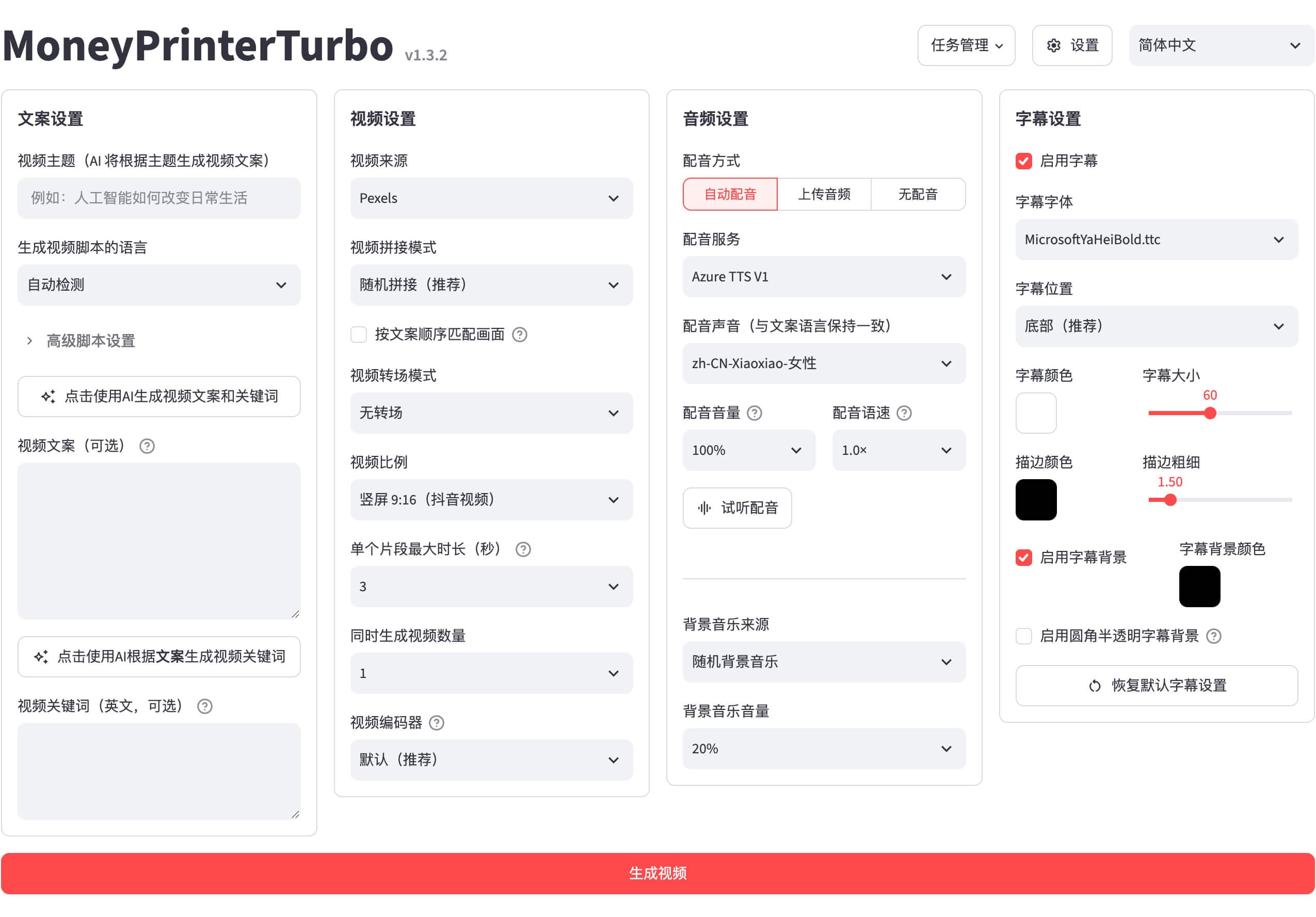
Published source example
Official MoneyPrinterTurbo WebUI screenshot; an interface demonstration, not a finished video. Read 2026-11-05. Not generated by Nano AI; not a measured result from the generator above.
Money Printer Turbo: What the sources establish
Sources read 2026-11-05. The official README describes topic-to-script, footage matching, subtitles, voice and video assembly. It offers Windows releases, uv source setup and Docker. Configure any external services separately.
Download, installation and alternatives for the open-source short-video workflow. Choose it for script, stock footage, subtitles and narration; use this generator for one new visual clip.
At a glance
- Source read
- 2026-11-05
- Original project
- MoneyPrinterTurbo contributors
- Generator here
- Kling 2.6
- Output here
- 5 seconds · 55 credits per video · sound:false
Official setup route
Use the linked upstream instructions for your environment; no install or GPU inference was performed here.
- 1
Get the project
The official README describes topic-to-script, footage matching, subtitles, voice and video assembly. It offers Windows releases, uv source setup and Docker. Configure any external services separately.
git clone https://github.com/harry0703/MoneyPrinterTurbo.git cd MoneyPrinterTurbo uv python install 3.11 uv sync --frozen - 2
Check its configuration
For the source checkout, launch the WebUI from the project root and configure external model, footage or voice credentials in its settings. Docker users must copy config.example.toml to config.toml before starting its release compose file.
- 3
Open the official workflow
Use the linked upstream instructions for your environment; no install or GPU inference was performed here.
sh webui.sh
Source files and downloads
| Resource | Purpose |
|---|---|
| MoneyPrinterTurbo releases | Official starting point |
Choose the right workflow
Original project
The official README describes topic-to-script, footage matching, subtitles, voice and video assembly. It offers Windows releases, uv source setup and Docker. Configure any external services separately.
Try here
This is a Kling 2.6 text-to-video clip, not MoneyPrinterTurbo: 5 seconds, 55 credits, sound:false. It does not assemble stock clips, captions or narration.
Published example
Official MoneyPrinterTurbo WebUI screenshot; an interface demonstration, not a finished video.
Original workflow and this generator
Sources read 2026-11-05.
| Original project | Nano AI | |
|---|---|---|
| Purpose | The official README describes topic-to-script, footage matching, subtitles, voice and video assembly. It offers Windows releases, uv source setup and Docker. Configure any external services separately. | This is a Kling 2.6 text-to-video clip, not MoneyPrinterTurbo: 5 seconds, 55 credits, sound:false. It does not assemble stock clips, captions or narration. |
| Access | Follow the official source | Sign in and use the generator above |
| Price here | Separate provider and billing | Kling 2.6 · 5 seconds · 55 credits per video · sound:false |
Create an original result
- 1
Prepare your idea
Choose an original prompt below. For image-to-video, upload one image you have permission to use.
- 2
Check the model and credits
The model shown above is the service used here; the source project’s features do not transfer to it.
- 3
Generate and review
Sign in, submit and inspect the result. Published examples are references, not a promise to reproduce them.
Prompts to adapt
Original templates to adapt. Published examples above are separate source material.
Studio
A quiet alpine lake at sunrise, slow camera push over still water, natural warm light, one continuous five-second shot, no people, no text, no audio.
Detail
A macro view of dew on a green leaf, gentle camera drift, soft morning light, one continuous shot, no text, no audio.
Setting
A small paper boat floating through a miniature canal, slow tracking camera, original scene, no logos, no text, no audio.
Variation
An overhead view of unbranded travel items on a wooden table, subtle light movement, stable composition, no text, no audio.
Setup limits
- Check upstream requirements
- Keep source-project credentials and billing separate from Nano AI. No performance guarantee is made.
FAQ
Money Printer Turbo · Questions before you start
Source facts and the separate hosted workflow.
Which model runs here?
This is a Kling 2.6 text-to-video clip, not MoneyPrinterTurbo: 5 seconds, 55 credits, sound:false. It does not assemble stock clips, captions or narration.
What does the original project do?
The official README describes topic-to-script, footage matching, subtitles, voice and video assembly. It offers Windows releases, uv source setup and Docker. Configure any external services separately.
Did Nano AI generate this example?
Official MoneyPrinterTurbo WebUI screenshot; an interface demonstration, not a finished video. Read 2026-11-05. Not generated by Nano AI; not a measured result from the generator above.
Are speed or quality claims tested here?
No local GPU or third-party inference benchmark was run. A static source image cannot establish motion, audio synchronization or an end-to-end speedup.
Where should I go next?
Use the related pages below for the existing model overview or another workflow.
More from Nano AI
Related guides
Nano AI is independent of the named projects and vendors. Public sources were read on 2026-11-05. Published media belongs to its source; this page does not add credits to third-party accounts.