
Third-party guide · Pruna · November 3, 2026
P-H3-Image: which pack to download for a smaller GPU
This is a third-party introduction, not Pruna's site and not a MiniMax page. P-H3-Image is Pruna's open image model built on MiniMax-H3. Nano AI does not host the weights and cannot run P-H3-Image.
Do not want a local GPU?
Qwen Image 2.1 runs in the browser instead of P-H3-Image
Nano AI does not run P-H3-Image. Qwen Image 2.1 is a different model this site does price: 8 credits a picture at 1K, up to 5 reference images. The 64 sign-up credits cover 8 of those pictures. It is not a P-H3-Image render.
- Made by
- Pruna
- Released
- November 3, 2026
- Run on Nano AI
- Qwen Image 2.1 · 8 credits per image
- Page updated
- November 5, 2026
Source: pruna.ai
Figures from the Pruna post
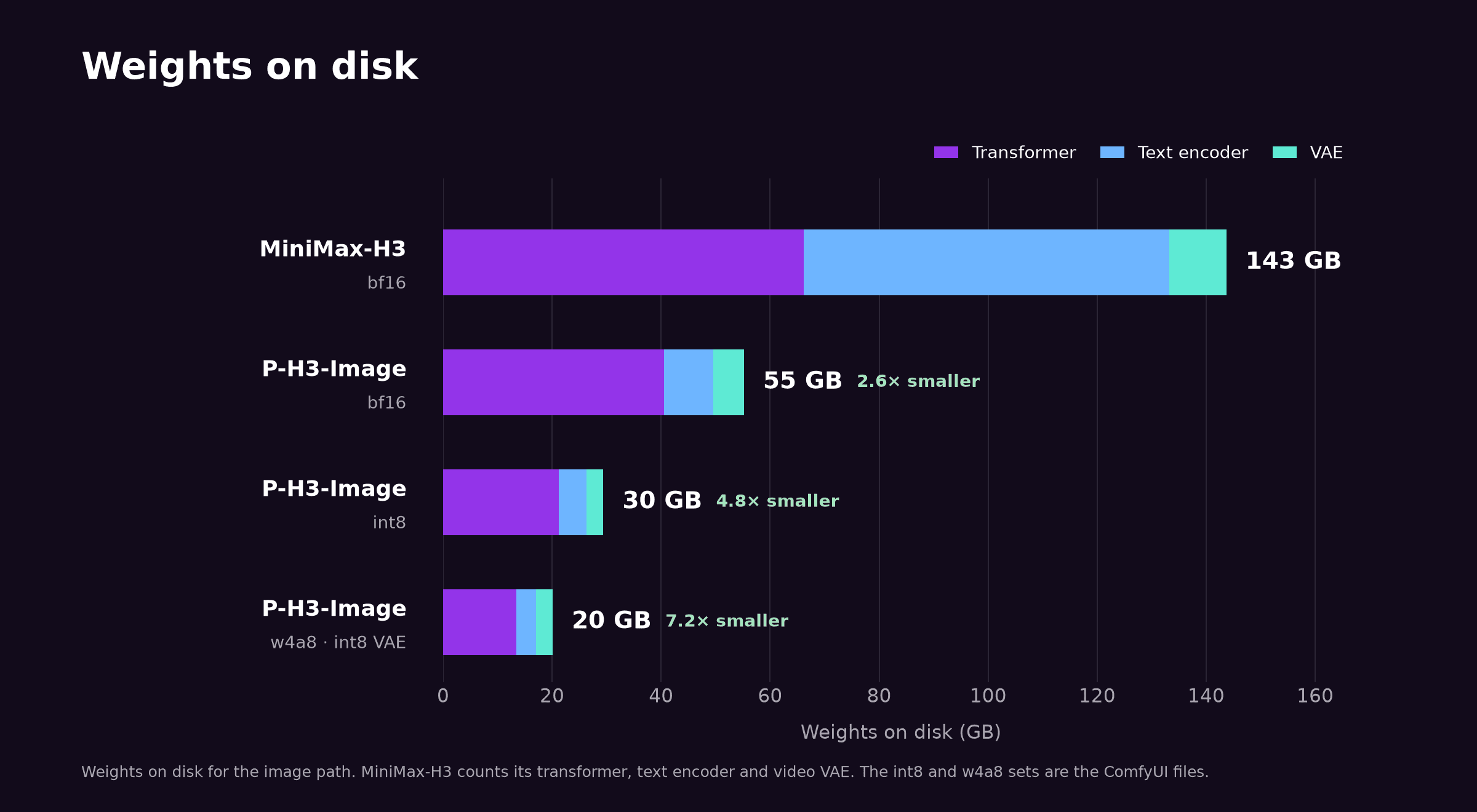
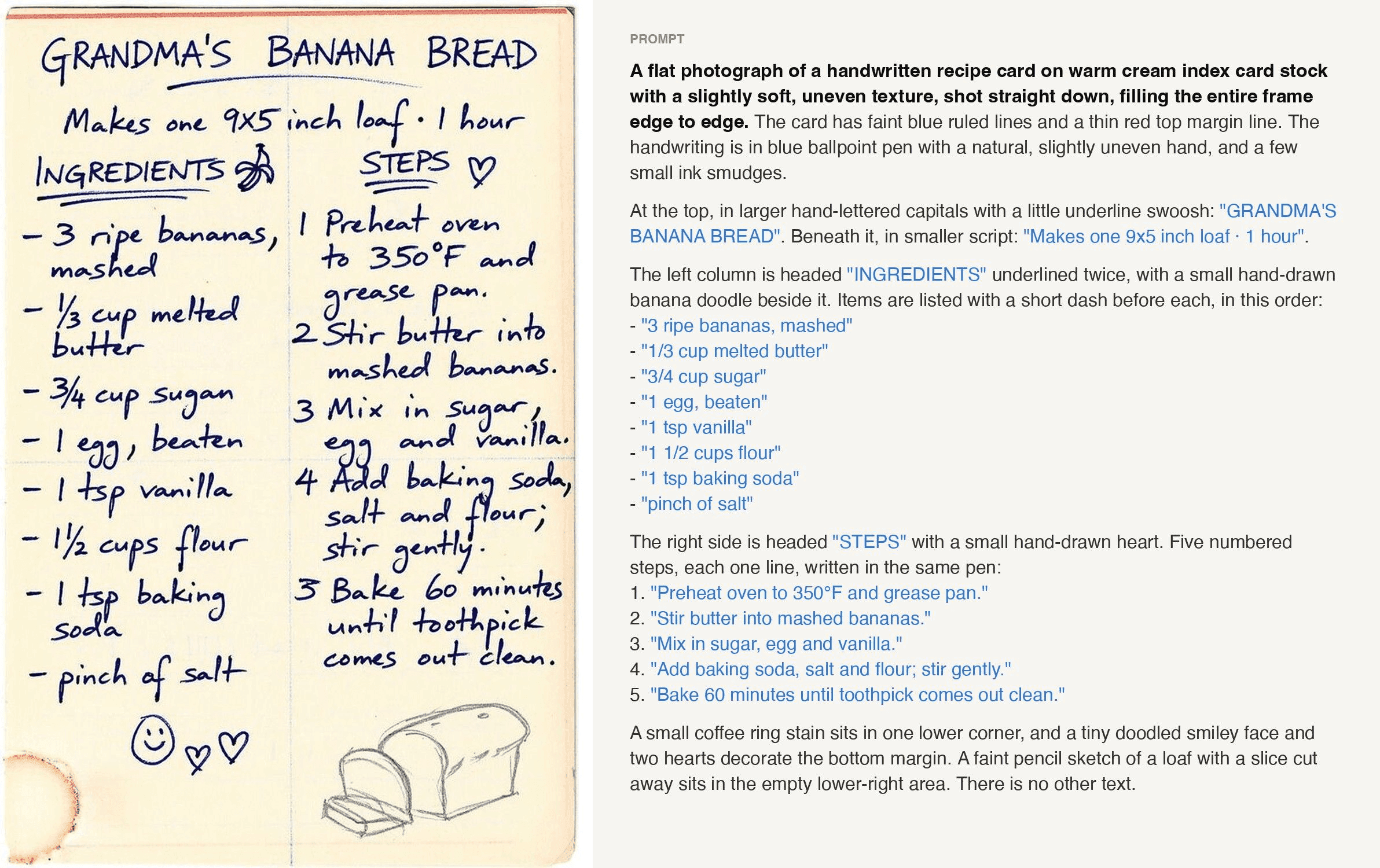
Downloaded on 2026-11-05 from the November 3, 2026 blog. The chart is their size comparison. The recipe card is their handwriting example, and its step numbers do not match the prompt beside it. Neither file is a Nano AI image.
What P-H3-Image is
Pruna's blog, dated November 3, 2026, presents P-H3-Image as an open-weights text-to-image and editing model built by reworking MiniMax-H3. The opening says the smallest version is 7x smaller than H3, 20 GB instead of 143 GB, and 5x faster, 2.6 seconds instead of 12.4 seconds for a 4 MP image on one B200. Their chart on the same post labels the 20 GB ComfyUI set 7.2× smaller than 143 GB. Those are Pruna's figures. This site has not timed a GPU.
The ComfyUI card, read the same day as this page, splits three sets: bf16 at 55 GB download and about 56 GB peak VRAM at 8 MP, int8 at 30 GB and about 31 GB, and w4a8 with an int8 VAE at 20 GB and about 21 GB. Those totals are the diffusion model, the text encoder and the VAE. The prompt upsampler is extra: the recommended bf16 file is 19.3 GB and about 21 GB peak. A 24 GB card is not a number the card promises. It says to use a smaller upsampler when 21 GB does not fit.
The weights follow the MiniMax H3 Community License. The card and the blog say that license excludes the European Union, the United Kingdom, the Republic of Korea and the United States unless you have a separate license from MiniMax, and that products built on it must show "Powered by MiniMax H3". Qwen parts of the text encoder and the upsampler are under Apache-2.0. The blog says the ComfyUI nodes are MIT. Please read the license. This page does not decide whether your use is allowed.
P-H3-Image packs from the ComfyUI card
- Who published it
- Pruna, November 3, 2026, based on MiniMax-H3
- This page
- A third-party guide. Nano AI does not run the weights
- bf16 set
- 55 GB download, about 56 GB peak VRAM at 8 MP
- int8 set
- 30 GB download, about 31 GB peak VRAM at 8 MP
- w4a8 set
- 20 GB download, about 21 GB peak VRAM at 8 MP
- Upsampler
- Extra. Recommended file 19.3 GB, about 21 GB peak
- Steps
- 8, no CFG, no negative prompt, per the card
- Edit inputs
- Card: up to 8 images. Blog opening: up to 9. Follow the card in ComfyUI
Eight ComfyUI steps for P-H3-Image
Copied from the PrunaAI/P-H3-Image-Comfy card and the November 3, 2026 blog, as read on November 5, 2026. This site has not installed the files.
- 1
Update ComfyUI from GitHub
The card says support is on master and ships with the next release. Until then, update a git install to the latest nightly. The desktop app and Comfy Cloud follow stable releases.
cd ComfyUI && git pull - 2
Pick a pack before you download
The card's set table, model plus text encoder plus VAE, not counting the prompt upsampler: bf16 is a 55 GB download and about 56 GB peak VRAM at 8 MP; int8 is 30 GB and about 31 GB; w4a8 with the int8 VAE is 20 GB and about 21 GB. The card says int8 stays very close to bf16, and w4a8 changes more details and sometimes the composition.
- 3
Download one file per component
Put the files under ComfyUI/models. The command below is the card's smallest set. The upsampler in that command is the 19.3 GB bf16 file, which is extra. The card also prints the repo name once in lowercase; if a download misses, try PrunaAI/P-H3-Image-Comfy.
hf download PrunaAI/P-H3-Image-Comfy --include "diffusion_models/p-h3-image_w4a8.safetensors" "text_encoders/p-h3-image_text_encoder_w4a8.safetensors" "text_encoders/p-h3-image_prompt_upsampler_bf16.safetensors" "vae/p-h3-image_vae_int8_convrot.safetensors" --local-dir ComfyUI/models - 4
Open a workflow from workflows/
The card lists p-h3-image_text_to_image.json, p-h3-image_edit.json, and two lora workflows for people who already have MiniMax-H3. The workflows use ComfyUI's own nodes.
- 5
Check the loaders
Load Diffusion Model takes the diffusion file. ModelSamplingMiniMaxH3 is set at 1.0 for both shifts. Load CLIP uses type minimax. Load VAE takes the VAE. p-h3-image Conditioning turns the prompt and the images into the conditioning and the latent.
- 6
Leave the upsampler on unless VRAM is the limit
The card says short requests render poorly without it. The recommended upsampler is p-h3-image_prompt_upsampler_bf16, 19.3 GB, about 21 GB peak and about 7 seconds a prompt on an L40S. Smaller upsamplers are 9.7 GB and 6.7 GB. Use those only when 21 GB does not fit. ComfyUI moves the upsampler out of VRAM when the image model needs the memory.
- 7
Run the 8-step sampler
The workflows sample with ManualSigmas, the 8-step grid, Basic Guider, euler and Sampler Custom Advanced. The card says there is no CFG and no negative prompt. Text-to-image prefers 8 MP. The card's 1:1 size at 8 MP is 2912 by 2912.
- 8
For an edit, keep image order
Connect the image to edit as image_1 and up to 7 references after it, in the same order on Batch Images and on p-h3-image Conditioning. The card says edits work best at 4 or 8 MP. The blog's opening sentence says up to 9 input images; the card and the later blog text say 8. Follow the card for ComfyUI.
P-H3-Image files for a smaller GPU
Sizes are the ComfyUI card's table, read on November 5, 2026. The 20 GB set is the diffusion model, the text encoder and the int8 VAE. The upsampler is additional.
| File | Folder in ComfyUI/models | Size on the card | When the card points at it |
|---|---|---|---|
| p-h3-image_w4a8.safetensors | diffusion_models | 13.4 GB | Smallest diffusion file. The card says it changes more details than bf16. |
| p-h3-image_text_encoder_w4a8.safetensors | text_encoders | 3.6 GB | Text encoder paired with the smallest set. |
| p-h3-image_vae_int8_convrot.safetensors | vae | 3.1 GB | VAE for the 20 GB set. The card does not list a w4a8 VAE. |
| p-h3-image_bf16.safetensors | diffusion_models | 40.5 GB | Full-precision diffusion file. The bf16 set is 55 GB and about 56 GB peak at 8 MP. |
| p-h3-image_prompt_upsampler_bf16.safetensors | text_encoders | 19.3 GB | Recommended upsampler. About 21 GB peak. Not included in the 20 GB or 55 GB set totals. |
Which pack the card is describing
20 GB is the w4a8 set
Diffusion 13.4 GB, text encoder 3.6 GB, int8 VAE 3.1 GB. Peak at 8 MP is about 21 GB. The card says this set changes more details, and sometimes the composition, than bf16.
30 GB stays closer
The int8 set is 30 GB and about 31 GB peak. The card says it stays very close to bf16, often almost pixel for pixel. That is their comparison, not one run here.
55 GB is still not the upsampler
bf16 model, encoder and VAE add up to the 55 GB set and about 56 GB peak. The 19.3 GB upsampler sits on top of that unless you turn it off.
Already have MiniMax-H3
The card offers a 2.0 GB LoRA, loras/p-h3-image_lora_bf16.safetensors, on your existing FL2VA transformer, instead of a second full download. This page has not loaded that LoRA.
P-H3-Image, MOSS-Image, FLUX.3 Klein and Qwen Image 2.1
P-H3-Image cells are the Pruna card and blog read on November 5, 2026. MOSS-Image cells match this site's MOSS-Image page. The last two columns are models Nano AI prices. Nobody timed these four against each other here.
| P-H3-Image | MOSS-Image | FLUX.3 Klein here | Qwen Image 2.1 here | |
|---|---|---|---|---|
| Who publishes it | Pruna, on MiniMax-H3 | OpenMOSS | Black Forest Labs | Alibaba |
| License they print | MiniMax H3 Community License, with excluded regions | Apache 2.0 | FLUX Kommunity License | Qwen Research License on the weights page |
| Where it runs | Your GPU, ComfyUI | Your GPU, ComfyUI | This site, 4 credits | This site, 8 credits |
| Editing | Card: up to 8 input images | No, on the MOSS-Image page | Yes, up to 5 references here | Yes, up to 5 references here |
| A size they publish | 20 GB smallest ComfyUI set | Local files, see the ComfyUI MOSS page | 1K on this site | 1K on this site |
| This site's button | Does not run P-H3-Image | Does not run MOSS weights | FLUX.3 Klein | Qwen Image 2.1, the no-install option |
Primary sources
Read these before you download. This page is not a mirror.
If you are not going to install it
- 1
Read the license first
The card says the European Union, the United Kingdom, the Republic of Korea and the United States are outside the license unless MiniMax grants a separate one. Please use the license text, not this sentence, to decide.
- 2
Or open a model this site runs
Qwen Image 2.1 is 8 credits at 1K. It is a different model. The button does not load P-H3-Image weights.
- 3
Compare with the pages you already have
MOSS-Image and its ComfyUI guide cover another local text model. FLUX.3 Klein is the 4-credit model on this site. None of those pages runs P-H3-Image.
Prompts for Qwen Image 2.1, not for the local weights
Use these only in the browser model. They do not configure ComfyUI and they are not P-H3-Image prompts.
Shop sign
A small bookstore window at dusk, a paper sign that reads "Late hours" and nothing else, warm light, no people.
Recipe card
A flat photograph of an index card titled "Oat loaf". Three ingredient lines and three steps, blue ink, no people, no extra text.
Moss wall
A damp stone wall covered in moss, one fern, soft overcast light, no text, no people.
Edit the sign
Change the sign text to "Open". Keep the window, the light and the frame exactly as they are.
Limits the card already prints
- The smallest set still changes the picture
- The card says w4a8 keeps the quality but changes more of the details and sometimes the composition. int8 stays closer to bf16. If you need the card's closer match, the int8 set is 30 GB and about 31 GB peak, not the 20 GB set.
- Short prompts look weak
- The card says the model is sensitive to prompting and that very short prompts are weak without the upsampler. Hype words and very long prompts make images worse.
- Text and hands
- The card says hands can break, small background figures can distort, and small or dense text becomes unreliable. Short quoted strings render better. The recipe sample on this page shows a numbering mismatch you can see.
- Repo name casing
- One command on the card uses PrunaAI/P-H3-Image-comfy and the next uses PrunaAI/P-H3-Image-Comfy. If a download 404s, try the other casing. The model card URL uses the capital C.
Do not want a local GPU?
Qwen Image 2.1 runs in the browser instead of P-H3-Image
Nano AI does not run P-H3-Image. Qwen Image 2.1 is a different model this site does price: 8 credits a picture at 1K, up to 5 reference images. The 64 sign-up credits cover 8 of those pictures. It is not a P-H3-Image render.
FAQ
P-H3-Image FAQ
Figures are from Pruna's blog and the ComfyUI card, read on November 5, 2026. This site did not remeasure them.
Does Nano AI run P-H3-Image?
No. There is no P-H3-Image control on this site. The browser model in the box above is Qwen Image 2.1, at 8 credits a picture. It is a different model.
Which pack is the small one?
The card's w4a8 set: a 20 GB download and about 21 GB peak VRAM at 8 MP, using the int8 VAE. The upsampler is not inside that 20 GB. The card says this set can change details and sometimes the composition.
What if 21 GB does not fit?
The card says to use a smaller upsampler, 9.7 GB or 6.7 GB, only when the 21 GB upsampler does not fit. It does not promise a specific consumer graphics card. The int8 and bf16 image sets are larger, not smaller.
Is the license fine for commercial use everywhere?
Do not take that from this page. The card says the license excludes the European Union, the United Kingdom, the Republic of Korea and the United States unless MiniMax grants a separate license, and that products must show "Powered by MiniMax H3". Read the license.
How does it compare with MOSS-Image and FLUX?
MOSS-Image is a different open model you run yourself; its page says it does not edit. FLUX.3 Klein on this site is 4 credits at 1K and does edit. P-H3-Image is Pruna's ComfyUI model. This site has not run a side-by-side test.
Did you verify a fine-tune toolkit?
No. A public mention of toolkit support was not opened for this page, so no fine-tune steps, file names or settings are listed.
More from Nano AI
Related local and hosted models
Nano AI is an independent service and is not affiliated with Pruna or MiniMax. P-H3-Image figures are from the blog dated November 3, 2026 and the PrunaAI/P-H3-Image-Comfy card as read on November 5, 2026. The license text controls. This site does not run the weights. The browser alternative is Qwen Image 2.1 at 8 credits.