
Fan art · Photo editing
GTA 6 ChatGPT Prompt for photos and posters
Want to put yourself on a game cover? Start with the selfie poster: the button opens Nano AI's editor with the prompt already filled in. Add your photo and generate. For scenery alone, pick a prompt from the second group.
Copying is free. In Nano AI, Nano Banana 2.1 costs 8 credits per 1K image. The 16 signup credits cover two.
Six copy-and-paste prompts
The first three use a photo. The next three start from text. Open any prompt in Nano AI with one click, or copy it.
With your photo
Selfie to character poster
4:5Turn my uploaded selfie into a 4:5 illustrated character poster for a fictional coastal open-world game. Keep my face shape, skin tone, hairline and expression recognizable. Frame me from the waist up beside a mint coupe, with a coral sunset and wind-bent palms behind me. Use bold ink contours, two-tone shadows and a thin peach rim light. Leave the top clear for my own title. No lettering or logos.
Night diner loading screen
16:9Make a 16:9 illustrated game loading screen from my photo. Keep my features, jacket and pose. Place me on the left third under the green glow of a late-night diner. Let the wet road lead toward a tiny warm light at the far right. Paint broad blocks of shadow with crisp outlines. Leave the lower right quiet. No menus, loading bar, words or logos.
Two-person game cover
2:3Use the two adults in my uploaded photo as the leads of an original 2:3 game-cover illustration. Preserve each person’s expression, hairstyle and position relative to the other. Put both together in the large upper panel. Below it, draw a motel key and an empty beachfront road in two smaller panels. Use narrow cream dividers, turquoise shadows and warm orange light. Keep all panels free of lettering and logos.
Scenes without a photo
Sunset boulevard and coupe
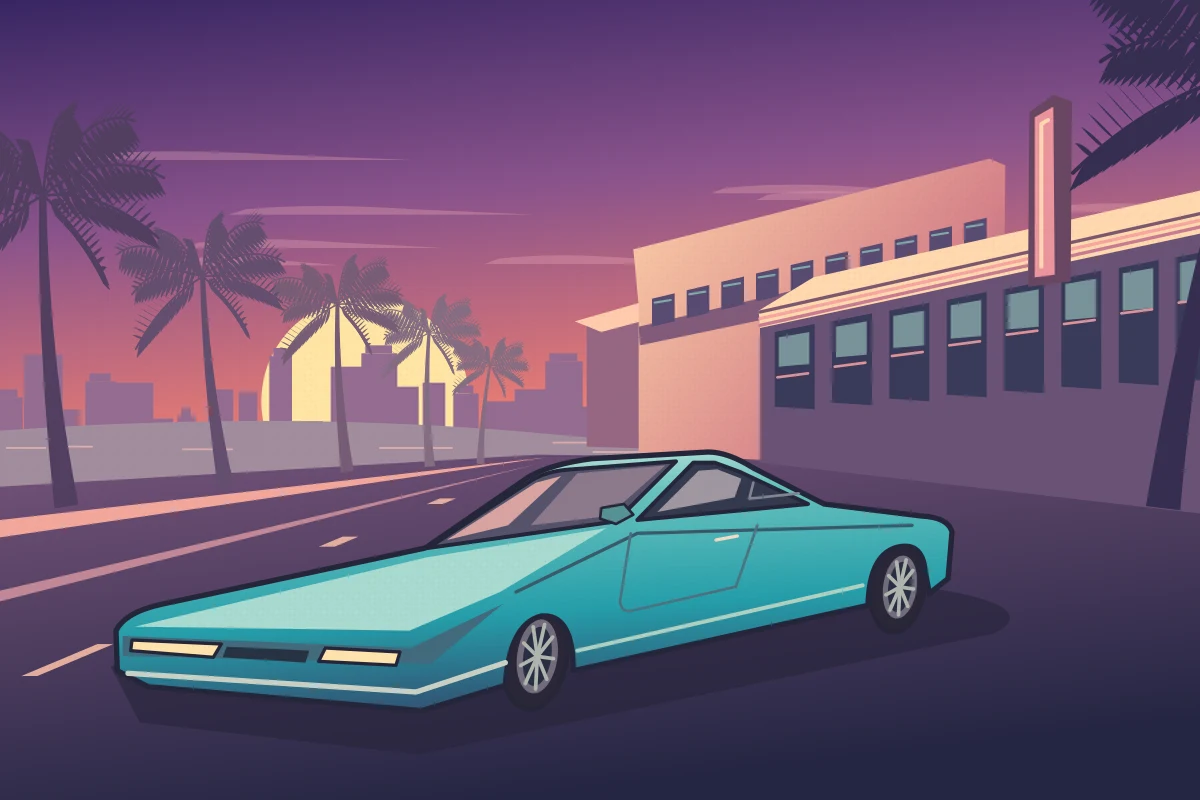
3:2Draw a 3:2 illustrated coastal boulevard at sunset. Park one low turquoise coupe diagonally across the foreground with its nose pointing left. Put a peach Art Deco motel on the right, layered palms on the left and a low yellow sun over the water. Use crisp dark outlines and long violet shadows like a screen-printed open-world game poster. No people, lettering or logos.
Marina phone wallpaper
9:16Create a 9:16 phone wallpaper of a fictional tropical marina just before sunrise. Look down from a bridge at a small white boat crossing a pool of amber light. Frame the lower corners with dark palms and use pale teal reflections to lead the eye to the boat. Keep the top quarter quiet for the phone clock. Use painted game-poster shading, without text or logos.
Three-panel coastal cover
1:1Design a square cover for an imaginary coastal driving game as three illustrated panels. Across the top, show an empty causeway under rose-colored clouds. In the lower left, crop tightly onto a chrome wheel. In the lower right, show a pink motel key on a teal counter. Repeat a single stripe of warm light across all three panels. Use dark ink edges, cream gutters, no letters and no logos.
The Nano AI button fills in the prompt and canvas size. For a portrait, attach your photo in the editor before generating.
- Made by
- Independent prompt page
- Run on Nano AI
- Nano Banana 2.1 · 8 credits per image
- Page updated
- November 20, 2026
Source: help.openai.com
How to adapt a GTA 6 ChatGPT Prompt to your own photo
The selfie prompt tells the model which details belong to you and which details it can redraw. Keep your expression and hairline in the first sentence about your face. Put the car, palms and lighting in a separate sentence so you can change them without rewriting the portrait.
For example, replace “beside a mint coupe” with “leaning on a sun-faded surfboard.” Keep the waist-up framing and peach rim light. The subject and silhouette stay readable even when the prop changes.
Pick a canvas
- Feed poster
- 4:5 portrait, framed from the waist up
- Loading screen
- 16:9 landscape, with the subject to one side
- Phone wallpaper
- 9:16 vertical, with open sky for the clock
Three edits to try on your first poster
If the face drifts
Ask for the same eye spacing, jawline and expression as in the reference. Leave the background as it is for this edit.
If the poster looks flat
Pick one light source, such as a coral sunset behind the left shoulder. Ask for a narrow highlight along that edge.
If you need a title
Leave a band of sky above the subject. Add your own lettering after you have the final crop.
Which prompt fits your picture?
| Start with | What to change | |
|---|---|---|
| One clear selfie | Character poster | The outfit, prop or time of day |
| A photo of two adults | Two-person game cover | Keep both in the upper panel and change the two details below |
| No photo | Coastal boulevard, marina or panel cover | Palette, weather and camera angle |
How to make your poster on Nano AI
- 1
Pick a photo or a scene
Use a well-lit selfie with an unobstructed face for a portrait. For a landscape or wallpaper, start with text alone.
- 2
Open the prompt in the editor
Press the Nano AI button on a prompt. The editor opens with the text and canvas size set. Add your photo if the prompt calls for one, then generate.
- 3
Refine one detail
Change one line of the prompt, such as “move the sun behind my left shoulder”, and generate again. Download the version you like.
Six copy-and-paste prompts
Jump back to the full prompts and their copy buttons.
FAQ
GTA 6 photo prompt questions
Photo choice, format and small fixes for the next version.
What should I paste to turn myself into a GTA 6 character?
Open “Selfie to character poster” in Nano AI and add a clear selfie in the editor. The prompt asks for your face and expression in a waist-up illustrated portrait.
How do I make a GTA-style loading screen?
Use “Night diner loading screen.” Its 16:9 layout puts the character on the left and uses a strip of reflected light to draw the eye across the road.
Can I do this without uploading a selfie?
Yes. The boulevard, marina and three-panel cover prompts describe the whole image from scratch. Each can be copied as written.
How do I keep two people recognizable?
Use a single photo in which both faces are clear. Start with the two-person cover and ask to preserve each person’s hairstyle, expression and position.
What costs credits here?
Copying any prompt is free. Generating on Nano AI with Nano Banana 2.1 uses 8 credits per 1K image. The prompts also work if you paste them into ChatGPT.
More from Nano AI
Related pages
These are independent fan-art prompts. Nano AI is not affiliated with Rockstar Games, Take-Two or OpenAI.